

What’s the best event management software for nonprofits in 2026—and how do you pick one? This guide compares 26 of the top event platforms side by side and explains the must-have features: CRM integration, mobile check-in, automated ticketing, and attendee engagement tools. Whether you’re hosting a local community workshop or a large-scale fundraising gala, the right platform will simplify your registration process, automate tedious data entry, and provide your attendees with the seamless, professional experience that they expect.
It’s definitely possible to run a modern nonprofit event without employing any event management software—but it’s not easy. If you want to handle event planning, ticketing, registration, communications, and fundraising by hand, we salute you—but you probably wouldn’t be reading this guide to event management software for nonprofits.
But if you’re a nonprofit that is holding events regularly or is looking to take your event fundraising game to the next level, finding an event management solution is a must. If you’re still reading, then we figure you fall into that camp.
We’re here to help! In this buyer’s guide, we’ll cover what event management software can do, what factors you should consider when buying a system, and 26 different event management solutions you can consider.
Here’s a list of every event management solution that we talk about in this article. Click on the name if you’d like to skip to that system’s entry!
We’ve got a lot to cover, so let’s get started!

Throw Events People Rave About—And Rally Behind
Take a self-guided tour to learn how Neon One’s event management tools simplify your operations every step of the way so that you can focus on giving your supporters an unforgettable experience.
What Is Nonprofit Event Management Software?
Nonprofit event management software is a specialized digital platform designed to help mission-driven organizations plan, execute, and track their events from start to finish. Unlike generic tools, it is built with a dual focus: streamlining complex event logistics and maximizing fundraising. The software centralizes everything into a single dashboard—from event logistics like ticketing, mobile check-ins, automated donor tracking, to specialized fundraising tools like text-to-give, charity auctions, and peer-to-peer campaigns.
The biggest advantage of this type of software is its ability to seamlessly sync with an organization’s central CRM or donor database. Instead of forcing overstretched staff to manually transfer data from spreadsheets, this type of software allows for donor data and event engagement to automatically log onto a supporter’s profile. The right software will eliminate administrative grunt work, ensure accurate data tracking, and allow nonprofit teams to focus on building lasting relationships with their donors.
Event Management Software FAQs
Nonprofits use event management software to keep registration, ticketing, payments, tax receipts, and attendee data in one system instead of scattered documents and spreadsheets, where key details slip through the cracks. Event management software automates routine tasks like tax receipts, protects attendee data, and gives guests a smooth, professional experience that builds confidence in attending and giving. For planning support beyond software, you can also use the nonprofit fundraising event planner from Neon One.
You can choose the right event management software in three steps. First, list your must-have features, such as a mobile bidding app or a simple RSVP form. Next, check your tech stack: a tool that integrates natively with your CRM, like Neon CRM, saves hours of manual data entry. Finally, compare the full fee structure, including per-ticket fees, not just the monthly cost. Before you decide, you can take a tour of Neon CRM event tools to see registration, ticketing, and check-in in action.
At a minimum, nonprofit event management software should include mobile-friendly registration, automated tax receipts, and basic reporting. From there, you can weigh other needs, such as communications, automations, volunteer management, and fundraising tools. Neon CRM, for example, combines smart ticketing and check-in, built-in email and text outreach, and workflow automation, so attendee details and donations land in the same supporter records. Explore the event management features in Neon CRM to see how those tools work together.
Best Features To Look For in Nonprofit Event Management Software
Before we get ahead of ourselves, let’s cover the basics. In this section, we’re gonna lay out the key features that these software solutions can perform.
Event Planning and Scheduling Features
Features that help with event planning and scheduling are a core part of what nonprofit event management software solutions provide.
These features allow organizations to:
- Create event calendars
- Plan event logistics
- Manage event timelines
- Set up one-time events, recurring events, or classes
- Coordinate activities efficiently
Nonprofit Event Planning, Registration, and Ticketing Features
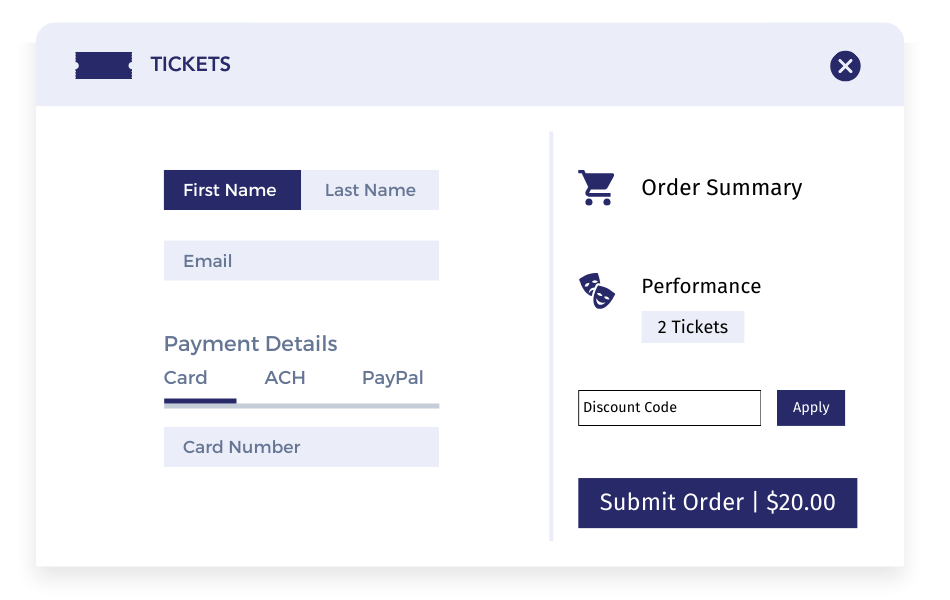
Registration and ticketing tools vastly simplify the process of attendee sign-ups and ticket sales for your event.
WIth the right event management platform, your nonprofit can:
- Customize registration forms
- Offer various ticket options, such as early bird pricing, discounts, and free admission for sponsors or volunteers
- Streamline the registration process
- Track attendee information
- Manage ticket inventory
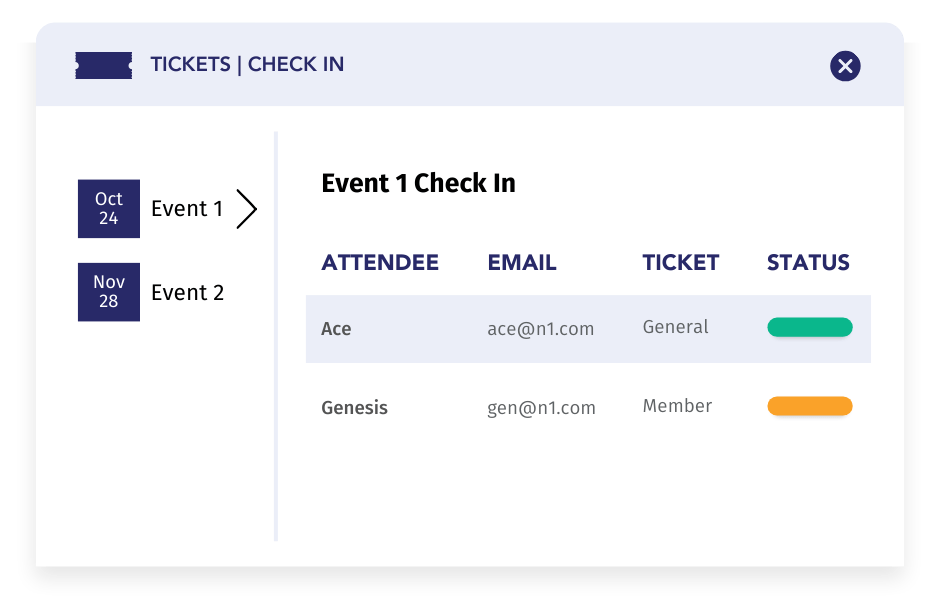
- Create a seamless check-in experience on event day
Fundraising and Donation Integration Features
Fundraising lies at the center of most nonprofit events, and finding an event management solution that includes fundraising tools will greatly streamline that process.
That’s why nonprofit event management solutions often provide features for:
- Ccollecting donations
- Setting fundraising goals
- Tracking donations in real time.
- Connecting fundraising efforts with event attendance
- Engaging donors
Communication and Marketing Features
If you’re trying to get people to register for your event (and, if you aren’t, then you should double check your strategy), effective communication and marketing are crucial.
Event management software assists nonprofits in:
- Creating and distributing promotional materials
- Sending automated event reminders
- Managing email campaigns
- Sharing events on social media
- Reaching a wider audience and boosting event participation
Data Management and Reporting Features
Data management and reporting features will give you insight into your progress toward your event’s goals, especially if you’ve set goals around fundraising, number of tickets sold, and other concrete metrics. They also really come into play after your nonprofit’s event is over and done—they’re important tools as you work to turn one-time attendees into long-term supporters.
Nonprofit event management software allows you to:
- Collect, store, and analyze data related to event attendees, ticket sales, and donations
- Understand how different event attendees support you in other ways
- Gain insights into your event performance
- View the data necessary for decision-making and refining future events
26 Event Management Solutions for Nonprofits (Updated 2026)
Okay, now that we’ve covered the basic functions of an event management platform and what factors you should consider when shopping for one, now we can turn to the main event: Actually picking an event management solution for your nonprofit!
The best solution for your nonprofit is going to depend on the specific circumstances of your nonprofit, so you won’t find any one-size-fits-all recommendations in this post.
What we can do is help you get started. Here’s a list of 26 event management solutions that your nonprofit might want to employ. And wouldn’t you know it, the number one spot just happens to be filled by our personal favorite …
| Event Software | Best For | Key Features | Starting Price |
|---|---|---|---|
| Neon One | All-in-one donor management | Manage donors, fundraising, communications, volunteers, grants, and events in a single streamlined solution. | $99/month |
| Arts People | Performing arts, theaters, and performance venues | Integrates ticket sales, fundraising, membership management, and marketing all in one place. | Starts at $0.99$ per ticket (usage-based, one-time flat fee). No ongoing monthly subscription dues. |
| ClickBid | Auctions & mobile bidding | Mobile bidding, ticket sales, and event promo capabilities, plus real-time reporting, make it suitable for maximizing fundraising efforts. | $895/year |
| Accelevents | Virtual and hybrid scaling | For virtual, hybrid, and in-person events. It offers tools that cater to conferences, trade shows, fundraisers, seminars, and career fairs. | $7,500 per event |
| A2Z Events | Trade shows, conferences, and corporate events | Tools for floor plan management, attendee engagement, sponsorship management, and lead retrieval. | Requires custom quote for pricing. |
| Bizzabo | High-production, complex events | Tools for registration, ticketing, attendee engagement, and analytics with a mobile events app that offers interactive features like live polling, Q&A sessions, and networking tools. | $17,999/year |
| Brushfire | Organizations managing diverse in-person and virtual events | Ticketing, registrations, virtual events, and custom event apps, catering to events like concerts, conferences, and festivals. | Transactional fee of $1.50 per paid attendee + 1% of ticket price, and $1.00$ per free attendee. No annual software fees. |
| Cvent | Large, complex events that need an end-to-end platform | Supports various events covering event planning and execution aspects from registration and ticketing to on-site management. | Requires custom quote for pricing. |
| DonorPerfect | Growing nonprofits that want an all-in-one system to streamline events | Integrates fundraising, donor management, and event management for nonprofits, simplifying event registration, ticketing, and donor engagement for virtual and in-person events. | $99 – $119/month |
| Doubleknot | Cultural organizations like museums, zoos, and nature centers | Custom registration forms and supports real-time ticket sales management, allowing organizations to monitor availability and pricing. | Requires custom quote for pricing. |
| Eventbrite | Small to medium event organizers and community groups | Users can create custom event pages, manage attendee lists, and sell tickets online. The mobile app supports registration with QR code scanning for check-ins. | Free for free events. Paid tickets incur platform fees starting at $1.79 + 3.7% per ticket sold. |
| Eventdex | Nonprofits hosting large-scale events and conferences | Manages the event lifecycle from planning to follow-up, with tools that promote events and increase visibility and engagement. | Registration fees start at $1 per ticket sold. ScanAttendee app is $299/event with lead retrieval at $100/exhibitor. |
| EventMobi | Associations, corporations, and event marketers | Engagement tools, like live polling, Q&A sessions, and gamification elements, encourage participation and make events dynamic. | Requires custom quote for pricing. |
| Eventzilla | Budget-conscious organizers | Manage the event lifecycle with custom-branded event pages, efficient ticket sales, and contactless check-ins. | Pay-as-you-go transactional pricing starting at $1.50$ per ticket. |
| GalaBid | Nonprofits, charities, and schools | Tools for silent and live auctions and donation campaigns, supporting real-time and mobile bidding. | Free tier utilizing voluntary donor tips. Paid plans start at $199/campaign. |
| Giveffect | Nonprofits of most sizes | Manage silent auctions, charity events, and online fundraisers with integrations tools for donor management, volunteer tracking, and fundraising. | Requires custom quote for pricing. |
| GiveSmart | Event-focused nonprofits | Tailored for managing silent auctions, charity events, and online fundraisers, enabling custom event pages for smooth registration and ticketing. | Custom annual licensing models, typically starting at $1,500 to $2,500/year depending on the required bidding modules. |
| RegFox | Smaller, budget-focused organizations | Registration and ticketing solutions for events like conferences, camps, classes, and fundraisers, supporting pricing models like early bird and group discounts. | Flat transactional platform fee of $0.99$ per paid registration. No ongoing subscription or licensing fees. |
| Regpack | Service-oriented organizations | Customizable registration and payment solutions for events, including automated billing features that streamline payments. | $400/month |
| RingCentral | Growing organizations with multi-channel engagement needs | Offers a flexible, scalable, and interactive experience for virtual and hybrid events, providing areas for Reception, Stage, Sessions, Networking, and Expo. | $99/month |
| SimpleTix | Simple ticketing for attractions, festivals, or performances | Branded event pages, efficient ticket sales, and dynamic mobile tickets for quick check-ins, supporting various ticket types and pricing tiers. | Flat transactional fee of $0.79 + 2% per ticket sold, with a maximum fee cap of $9.99 per ticket. No subscription fees. |
| Stova | Large-scale enterprises and associations | Supports high-volume, repeatable events with lead generation, sponsor and exhibitor management, and detailed reporting. | Requires custom quote for pricing. |
| Ticket Tailor | Small-to-medium event organizers | Supports multiple ticket types, including early bird discounts, group rates, and VIP packages, providing flexible pricing strategies. | Pay-as-you-go ticketing starting at $0.20$ to $0.65$ per ticket, or monthly subscription plans starting at $19/month. |
| Tix | Venues and promoters | Designed to simplify online ticket sales, box office management, and attendee management with customizable ticketing solutions, including assigned seating and real-time sales tracking. | Transaction-only fee structures starting at $0.25 to $1.50 per ticket. |
| Whova | Event organizers looking for all-in-one platform | Enhances attendee engagement and streamlines event logistics with features like registration, networking, and engagement tools. | Requires custom quote for pricing. |
| WildApricot | Membership organizations | Integrates membership management with event planning, promoting events directly to members and enhancing engagement. | $60/month |
1. Neon One

Neon One’s Neon CRM (hey, that’s us!) is a comprehensive, all-in-one nonprofit platform that lets you manage donors, fundraising, communications, volunteers, grants, and events in a single streamlined solution.
The CRM’s new and improved events module is perfectly suited for nonprofits that are holding classes or performances, and it includes a step-by-step event builder and templates that let you create multiple events with zero hassles. That intuitive interface extends to the tools you’ll use to manage ticket sales and exchanges, refunds, donations, seat assignments, and more.
The platform’s targeted marketing tools attract the right audience with special rates and discounts. Efficient ticketing features and quick check-in options enhance the attendee experience, supported by real-time attendance data and fraud prevention. Our advanced seat management minimizes booking errors.
With Neon One, your nonprofit can manage all aspects of your events, from registration and ticketing to donor engagement and post-event follow-up, within a single, user-friendly platform. It’s a great solution for nonprofits that want a single comprehensive tech solution for their nonprofit and want to minimize the number of platforms they have to juggle.
Key Features
- Event Creation Wizards & Seating: Simplify event setup with ready-to-use templates and precise seat management that minimizes booking errors.
- Smart Ticketing & Check-In: Manage digital or printed ticket sales, offer group rates, and use ticket scanning to prevent fraud and speed up the check-in line.
- Built-In Email & Text Outreach: Segment your audience to send responsive email campaigns, targeted event marketing, and real-time text communications.
- Robust Membership & Store Management: Automate member renewals, launch private directories, and easily manage online product sales.
- Workflow Automation: Save time and reduce manual data entry by automating repetitive day-to-day tasks.
- Conversion-Optimized Donation Pages: Create attractive landing pages with built-in options for recurring giving and donor-covered fees.
- Centralized Donor Database: Track supporter information with customizable fields, a user-centric dashboard, and an engagement timeline to monitor moves management and surveys.
- Grant & Volunteer Tracking: Stay on top of funding opportunities and volunteer hours within the same system.
- Secure, Integrated Payments: Process transactions securely via Neon Pay with real-time financial reporting and a free, built-in PCI Compliance Program.
- Powerful Performance Reporting: Gain detailed insights into fundraising and event performance to make confident, data-driven decisions.
- Free Unlimited Support: Access real-time help whenever you need it via free live chat, email, and phone support.

See Neon One in Action!
Check out these 12 self-guided tours and learn how Neon One’s tools empower nonprofits to connect with their communities, move their supporters to action, and simplify their operations.
This software might work for you if want:
- Flexible Event Management—Especially Classes: Neon One’s CRM has strong capabilities for managing various types of events, including ticketing and attendee tracking, and its tools for creating ongoing class events are truly a cut above the rest.
- Comprehensive Toolset: The platform offers an extensive range of features for event management, donor tracking, fundraising, emails, text messaging, volunteers, grants, and (especially) membership management.
- A User-Friendly Interface: The platform is designed with ease of use in mind, making it accessible even for users with limited technical expertise.
- Versatile Membership Management: Neon One automates renewals, tracks member engagement, and supports exclusive member events.
- Powerful Communication Tools: Built-in email marketing and text-to-communicate features enhance outreach efforts.
- A Scalable Solution: Designed to grow with your organization, Neon One easily accommodates increasing needs and complexity.
But watch out for:
- Learning Curve: While user-friendly, new users may require some time to fully explore and utilize all the features available.
- Cost: Because you also get a complete nonprofit CRM in addition to your events management software, the starting costs for Neon CRM can be higher than an events-only solution.
- Possible Feature Overload: The extensive range of features might be overwhelming for some users initially.
Plans & Pricing
Neon CRM pricing starts at $99 per month with an additional 20% fee for the events module. For that price, you get a powerful event management system with registration, flexible ticketing, event pages, check-in, seating charts, and automated reminders—plus a full donor database, fundraising, email, text, automated workflows, peer-to-peer, and reporting and analytics built in. You’ll also get free live chat, email, and phone support, along with unlimited users, forms, emails, workflows, campaigns, reports, and records.
Speaking of unlimited records, something unique about Neon CRM is that we don’t charge based on the number of contacts in your database. Instead, we charge based on your revenue. In other words, you won’t pay more until you raise more.
Beyond event management and the base CRM, you can also add modules for memberships and volunteers. These let you expand your work without also adding more and more tools to your tech stack.
Here’s a little bit more about them:
- Memberships: Everything you need from automated renewals and tiered membership levels to a self-service member portal and lapsed member tools, all fully integrated with your CRM.
- Volunteers: This module makes it easy to manage roles, shifts, timesheets, and applications while giving your volunteers a self-service portal where they can sign up and stay connected on their own terms.
Neon CRM is built for building personal relationships. With every data point and every relationship in one integrated platform, you’ll have a much easier time understanding your attendees, identifying trends, and personalizing your outreach.
If you’d like to know more about Neon CRM, download our pricing guide.
See Neon One in Action
Want to learn more about Neon One’s event management CRM features? We don’t blame you! Schedule a personal demo today to see everything the system can do for you and your next event. We look forward to hearing from you!
2. Arts People

Arts People (yes, that’s us again!) is a ticketing and event management platform specifically designed for the unique needs of performing arts organizations like theaters, concert halls, and other performance venues.
This all-encompassing solution offers a wide range of features, including ticket sales, donor management, memberships, retail sales, and volunteer coordination.
One of Arts People’s most notable features is its flexible CRM, which provides detailed tracking and reporting of patron interactions, donations, and ticket sales, offering valuable insights to help optimize organizational strategies.
The platform’s affordability, along with its comprehensive functionality and user-friendly interface, makes it an ideal choice for small to medium-sized arts organizations seeking to streamline administrative tasks and enhance patron engagement.
Key Features
- Flexible, Customizable Ticketing: Sell online or in person with customizable seating charts, flex passes, season subscriptions, and rule-based pricing tiers (like weekend vs. weekday pricing).
- Seamless In-Person & Digital Sales: Mirror your physical box office by integrating tickets, retail sales, subscriptions, and class registrations into one easy-to-use platform.
- Targeted Campaigns: Launch customizable fundraising campaigns that support specific programs, complete with options for recurring giving and matching gifts.
- Tiered Membership Management: Run rolling, annual, or one-time membership campaigns with built-in promotional tools to reward your loyal patrons.
- Intuitive Interface & Web Matching: Enjoy a user-friendly system for both your team and your patrons, including customizable public pages that match your organization’s exact branding.
- Secure Transactions: Process credit cards and alternative options like PayPal safely with built-in data protection.
- Unified Reporting & Analytics: Track real-time insights across ticket sales, donations, memberships, and attendance to confidently plan your next move.
- Specialized Arts Support: Access a highly responsive customer support team that actually understands the unique needs and nuances of the arts world.
This software might work for you if want:
- Intuitive User Interface: Arts People offers an easy-to-use interface that simplifies ticket buying for customers and event management for administrators.
- Comprehensive Features: It integrates ticket sales, fundraising, membership management, and marketing, all within a single platform, providing a holistic solution for performing arts organizations.
- Customizable Options: The software allows customization of seating charts, patron lists, and donation campaigns, tailoring the platform to specific organizational needs.
- Versatile Ticketing Options: Arts People supports a variety of ticketing needs, including season subscriptions, flex passes, and promotional passes.
- Affordable Pricing: Compared to other similar platforms, Arts People offers competitive pricing, making it accessible for small to midsize nonprofits.
But watch out for:
- Complex Advanced Features: Some advanced features can be complex and require additional time to master.
- Mobile Interface Issues: The mobile interface is not as user-friendly as the desktop version, which can be a barrier for some patrons.
- Email Functionality: The platform’s email marketing tools are somewhat limited and can be challenging to use for large campaigns.
Plans & Pricing
Arts People doesn’t have specific pricing plans, as costs can vary based on the organization’s size and specific needs.
To explore how Arts People can support your organization’s ticketing and event management needs, we encourage you to schedule a demo with our team.
Our experts will work with you to create a customized solution that fits your requirements and budget, ensuring you get the most value from our comprehensive platform.
Build Your Audience With Arts People
Our platform was designed for artists, by artists. That’s why it has all the tools you need to attract, entertain, and retain patrons.
3. ClickBid

ClickBid is a dynamic fundraising events platform tailored for nonprofits, offering tools for managing auctions, ticket sales, and event promotions. As an official Neon One Partner, ClickBid offers a seamless integration with Neon CRM, greatly enhancing its utility for Neon CRM clients. The platform provides a user-friendly interface, mobile bidding capabilities, and real-time reporting, making it suitable for maximizing fundraising efforts. It supports various auction formats, including silent, live, and hybrid, and offers insights into bidding activity and attendee engagement.
Key Features
- Mobile Bidding: Allows attendees to place bids via smartphones, enhancing engagement and participation.
- Customizable Event Pages: Tailor event pages to reflect your organization’s branding and provide detailed information.
- Multiple Auction Formats: Supports silent, live, and hybrid auctions.
- Real-Time Reporting: Provides insights into bidding activity, attendee engagement, and event performance.
- Automated Communication Tools: Send personalized emails and text messages to attendees.
- Secure Payment Processing: Integrates with popular payment gateways for efficient transaction handling.
- Pre-Event Online Check-In: Reduces wait times and streamlines the check-in process.
- Recurring Donations: Supports ongoing donor contributions.
- Live Auction Integration: Easily input live auction winners for quick checkout.
This software might work for you if want:
- User-Friendly Interface: Easy to navigate and set up, making it accessible for users with varying technical skills.
- Mobile Bidding Capabilities: Increases engagement and bid amounts through convenient smartphone access.
- Comprehensive Support: On-call support available throughout the event, ensuring smooth operations.
But watch out for:
- Pricing Transparency: Some users have noted a lack of upfront pricing details on the website.
- Learning Curve: While user-friendly, new users may need time to fully explore and utilize all features.
- Customization Limitations: Certain advanced customization options may be limited without additional support.
Plans & Pricing
ClickBid offers a straightforward pricing structure that is tailored to the specific needs of nonprofits, ensuring both affordability and value. The platform provides several plans to accommodate different event sizes and requirements:
- Starter Plan: $795 per event for basic features, including mobile bidding, custom event pages, and real-time reporting.
- Professional Plan: $1,595 per event, adding advanced features such as enhanced reporting and premium support.
- Enterprise Plan: Custom pricing for organizations with extensive needs, offering full platform access and dedicated support.
For precise pricing tailored to your nonprofit’s specific needs, contact ClickBid directly to get a customized quote that fits your event needs. And to learn more about how ClickBid integrates with Neon CRM, click the button below.
4. Accelevents
Accelevents is an event management platform for virtual, hybrid, and in-person events. It offers tools that cater to conferences, trade shows, fundraisers, seminars, and career fairs. Accelevents can manage both small and large-scale events efficiently and includes features like live polling, Q&A sessions, and networking tools to encourage attendee participation and interaction.
Key Features
- Custom event pages
- Ticketing and registration tools
- Real-time analytics
- Live polling and Q&A sessions
- Networking tools
- Gamification elements
- Integration with payment gateways
- Support for virtual, hybrid, and in-person events
This software might work for you if want:
- User-Friendly Interface: Users appreciate the platform’s intuitive design, which makes it easy to set up and manage events.
- Comprehensive Feature Set: Accelevents offers a wide range of tools that cover all aspects of event management, from registration to engagement.
- Excellent Customer Support: The platform provides reliable customer support, ensuring any issues are promptly addressed.
But watch out for:
- Pricing: Some users find the pricing plans to be on the higher side, especially for smaller organizations.
- Learning Curve: While the platform is user-friendly, some users note that it can take time to fully understand and utilize all features effectively.
- Limited Customization Options: A few users have mentioned that they would like more flexibility in customizing the event pages and other features.
Plans & Pricing
Accelevents offers several pricing plans tailored to different organizational needs:
- Professional Plan: Starting from $5,000, this plan is ideal for hosting a single event. It includes all pro features and offers unlimited registration types, custom fields, and staff-managed or kiosk-based check-in and badge printing.
- Business Plan: Starting from $12,000, this plan is best for growing organizations with multiple events. It includes all the features of the Professional plan plus additional capabilities like cross-event reporting and custom reporting.
- Enterprise Plan: This plan offers customized pricing and is best for organizations operating events across various departments. It includes all the features of the Business plan, approval workflows, and API & webhooks.
- White Label Plan: This plan also offers customized pricing and is ideal for organizations needing extensive branding options. It includes all Enterprise features, the removal of Accelevents branding, custom URLs, email domains, and a branded app with a store listing.
For precise pricing, contact Accelevents directly to get a customized quote that fits your specific needs.
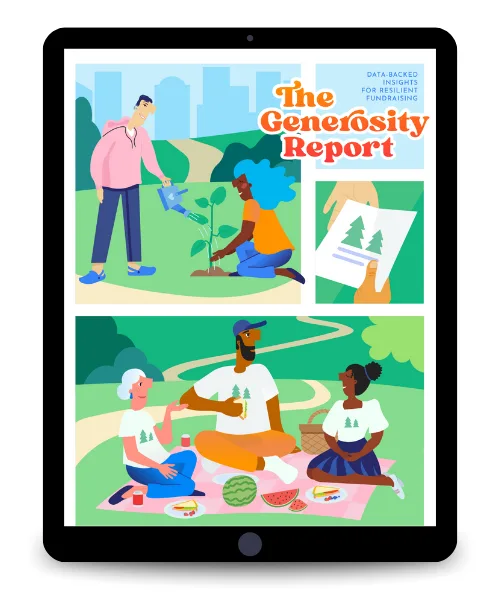
Go Beyond Donations: The Power of Events
Learn how to create impactful event experiences that drive deeper engagement and support beyond the event day – download The Generosity Report now!
5. A2Z Events

A2Z Events provides solutions for trade shows, conferences, and corporate events, with tools for floor plan management, attendee engagement, sponsorship management, and lead retrieval. The platform is designed to streamline event operations and enhance the experience for attendees and exhibitors, offering features that facilitate networking and connection, as well as sponsorship management.
Key Features
- Floor Plan Management
- Attendee Engagement
- Sponsorship Management.
- Lead Retrieval
- Attendee Tracking
- Mobile App
- Revenue Generation
This software might work for you if want:
- Comprehensive Feature Set: Users appreciate the wide range of tools available, from floor plan management to lead retrieval.
- User-Friendly Interface: The platform is praised for its intuitive design, making it easy for users to navigate and utilize.
- Customization Options: The ability to customize floor plans, attendee profiles, and sponsorship packages is highly valued.
But watch out for:
- Learning Curve: Some users mention that the platform can be complex to learn initially.
- Customer Support: A few users have reported delays in customer support response times.
- Cost: While offering extensive features, some users feel the pricing may be on the higher side for smaller organizations.
Plans & Pricing
A2Z Events does not provide detailed pricing information publicly. To get precise pricing, contact A2Z Events directly for a customized quote, as the pricing structure is typically based on the scale and complexity of your events.

6. Bizzabo
Bizzabo supports nonprofits in organizing various events, from virtual and hybrid formats to large-scale conferences and fundraisers. It offers tools for registration, ticketing, attendee engagement, and analytics. Bizzabo allows the creation of professional event websites tailored to branding needs and specific events. Its mobile event apps enhance attendee engagement through interactive features like live polling, Q&A sessions, and networking tools.
Key Features
- Customizable registration forms
- Mobile event apps
- Interactive agendas
- Live polling and Q&A sessions
- Networking tools
- Detailed reporting and analytics
- Integration with other software systems
- Smart wearables
This software might work for you if want:
- User-Friendly Interface: Many users appreciate Bizzabo’s intuitive design, which makes it easy to navigate and set up events. The platform’s simplicity helps streamline the event planning process and enhances the user experience for both organizers and attendees.
- Comprehensive Feature Set: Bizzabo offers a wide range of features that cover all aspects of event management. From registration and ticketing to attendee engagement and analytics, Bizzabo provides everything needed to run successful events.
- Excellent Customer Support: Users frequently mention Bizzabo’s responsive and helpful customer support team. The availability of dedicated account managers and support staff ensures that any issues are quickly resolved, contributing to a smoother event planning experience.
But watch out for:
- High Cost: Some users find Bizzabo to be relatively expensive compared to other event management platforms. The cost may be a barrier for smaller nonprofits with limited budgets.
- Complex Navigation: While the platform is generally user-friendly, some users report difficulties navigating the backend to find specific features. This can make the setup process more time-consuming for those who are not familiar with the platform.
- Limited Customization: A few users have noted that the platform’s customization options are somewhat limited, particularly when it comes to designing registration sites and event pages. This can restrict the ability to fully tailor the event experience to specific needs.
Plans & Pricing
Bizzabo offers customizable pricing plans tailored to the specific needs of each organization. Due to the range of features and services provided, exact pricing can vary significantly.
The company’s pricing structure typically includes a base fee and additional costs based on the number of events, attendees, and specific features required. For precise pricing, contact Bizzabo directly to get a customized quote that fits your unique requirements.

Want help planning your next fundraiser?
Our nonprofit fundraising event planner walks you through the entire process from start to finish, with expert insights and free resources to help guide you.
7. Brushfire
Brushfire offers tools for managing ticketing, registrations, virtual events, and custom event apps, catering to events like concerts, conferences, and festivals. The platform features a user-friendly interface and customizable options, allowing tailored event pages. Brushfire manages detailed seating assignments and includes volunteer management tools for coordinating volunteer activities effectively.
Key Features
- Customizable event pages and registration forms
- Detailed seating assignments and volunteer management
- Real-time ticket sales tracking and ticket scanning
- Support for virtual events and custom event apps
- Automated email notifications and push notifications
- Real-time reporting and analytics
This software might work for you if want:
- Ease of Use: Users appreciate Brushfire’s intuitive interface and straightforward setup process, which make managing events simple and efficient.
- Customer Support: Brushfire is praised for its responsive and knowledgeable customer support team, which provides excellent assistance throughout the event planning process.
- Customization: The platform offers extensive customization options for event pages and registration forms, allowing organizations to tailor their events to meet specific needs and branding requirements.
But watch out for:
- Advanced Features Learning Curve: Some users find that mastering the more advanced functionalities can take time, suggesting a need for more detailed tutorials or an enhanced knowledge base.
- Video Conferencing Integration: Brushfire does not have built-in video conferencing support, requiring users to set up separate video conferencing solutions.
- Cost Considerations: While the platform is praised for its features, some users mention the costs associated with premium services and suggest evaluating the pricing structure based on event needs.
Plans & Pricing
Brushfire’s pricing is designed to be flexible and straightforward, with a pay-as-you-go model that includes no startup costs or annual fees. The standard per-ticket fee is $1.50 plus 1% per attendee.
Additionally, organizations can choose to pass on these fees to attendees, charge a custom fee, or absorb the fees entirely. Brushfire also offers special pricing for events requiring daily tickets or timed entry admissions.
For precise pricing details and to explore additional premium services, contact Brushfire directly.
8. Cvent

Cvent supports various events, including conferences, fundraisers, and galas, covering event planning and execution aspects from registration and ticketing to on-site management. Nonprofits can create professional event websites and custom registration forms while using attendee engagement tools like interactive agendas, networking features, and mobile apps. Cvent’s analytics and reporting tools provide real-time data on registration and engagement metrics.
Key Features
- Custom event websites and registration forms
- Online ticket sales and management
- Attendee engagement tools (interactive agendas, networking features, mobile apps)
- On-site management (check-in, badge printing)
- Advanced analytics and reporting
- Integration with CRMs and other systems
- Email marketing and social media promotion
This software might work for you if want:
- Comprehensive Feature Set: Users appreciate the wide range of features available, allowing for extensive customization and flexibility in event management.
- Analytics and Reporting: The advanced analytics tools provide detailed insights into event performance, which is valuable for measuring success and planning future events.
- Integration Capabilities: The platform integrates well with other systems, streamlining data management and enhancing overall functionality.
But watch out for:
- Cost: Some users find the platform to be more expensive compared to other options, which can be a concern for smaller organizations.
- Complexity: The extensive features can make the platform complex and challenging to navigate for some users, particularly those who are not as tech-savvy.
- Learning Curve: There is a noted learning curve associated with mastering the platform, which can require significant time and training.
Plans & Pricing
Cvent offers flexible pricing that scales with your event needs. The pricing model is based on two main factors: An annual license fee and a per-registrant fee.
Your nonprofit can choose between two different licenses:
Professional License:
- Includes essential event management solutions.
- Access to additional professional platform features.
- Customizable pricing based on event needs.
Enterprise License:
- Includes all Professional features plus additional enterprise functionalities.
- Features like enhanced security, advanced integrations, and comprehensive reporting.
- Custom pricing tailored to large-scale event needs.
For precise pricing, contact Cvent directly to get a customized quote that fits your organization and your needs.
9. DonorPerfect

DonorPerfect integrates fundraising, donor management, and event management for nonprofits, simplifying event registration, ticketing, and donor engagement for virtual and in-person events. It offers customizable registration forms and secure payment processing. Automated email tools enable timely updates to registrants, and the platform tracks ticket sales and manages attendee lists, generating detailed performance reports.
Key Features
- Customizable registration forms
- Integrated secure payment processing
- Automated email communication tools
- Detailed reporting and analytics
- Comprehensive donor management integration
- Mobile accessibility
This software might work for you if want:
- User-Friendly Interface: Many users appreciate DonorPerfect’s intuitive design that makes it easy for both new and experienced users to navigate the platform efficiently.
- Excellent Customer Support: Users consistently highlight the quality of customer service, noting that support representatives are responsive and helpful.
- Integration Capabilities: The platform’s ability to integrate with other systems such as QuickBooks and Constant Contact is frequently praised, helping to streamline operations and maintain data consistency.
But watch out for:
- Complex Reporting: Some users find the reporting process to be less intuitive, requiring additional time and effort to generate specific reports.
- Limited Online Forms: The functionality of online forms is seen as less streamlined compared to other services, with users noting the need for improvements in ease of use.
- Cost of Support: A few users mention that the cost of phone tech support can be an added expense, which may be a consideration for smaller nonprofits.
Plans & Pricing
DonorPerfect offers multiple pricing tiers designed to fit the varying needs of nonprofits:
- Lite Plan: $89 per month, including core donor management features and essential tools for small organizations.
- Express Plan: $159 per month, offering additional functionality such as advanced reporting and integration capabilities.
- Essentials Plan: $289 per month, providing comprehensive features, including event management and automated workflows.
- Premier Plan: Custom pricing, tailored for larger nonprofits with extensive requirements, offering the full suite of DonorPerfect capabilities.
This comprehensive approach ensures that nonprofits of all sizes can find a plan that meets their needs, whether they are managing a small donor base or a large-scale fundraising operation.
For precise pricing and to determine the best fit for your organization, contact DonorPerfect directly to get a customized quote that fits your needs.

10. Doubleknot

Doubleknot is designed for cultural organizations like museums, zoos, and nature centers, offering solutions for event registration, ticketing, and membership management. It creates custom registration forms and supports real-time ticket sales management, allowing organizations to monitor availability and pricing. Doubleknot is suitable for nonprofits needing a holistic view of supporter interactions across events, memberships, and donor relationships.
Key Features
- Custom registration forms
- Real-time ticket sales management
- Seamless integration with donor and membership management tools
- Detailed reporting and analytics
- Flexible payment and promotions
- Mobile sales and check-in apps
- Upsell and cross-sell capabilities
- Capacity and waitlist management
- Group reservations and bookings
- Timed-entry ticketing and capacity control
This software might work for you if want:
- Customizability: Users appreciate the ability to create custom registration forms and tailor event pages to their specific needs.
- Integration: The seamless integration with donor and membership management tools provides a comprehensive view of supporter interactions.
- Detailed Analytics: The platform offers in-depth insights into event performance, helping organizations make informed decisions.
But watch out for:
- Complexity: Some users find the platform complex to set up and navigate initially.
- Customer Support: There are mixed reviews about the responsiveness and effectiveness of customer support.
- Cost: While the platform offers robust features, some users feel that the pricing can be high for smaller organizations.
Plans & Pricing
Doubleknot does not list specific pricing plans on its website. For detailed pricing information, it is recommended to contact Doubleknot directly to receive a customized quote that fits your organization’s specific needs.
11. Eventbrite

Eventbrite is used for various events, from community gatherings to large-scale conferences and festivals. Users can create custom event pages, manage attendee lists, and sell tickets online. The mobile app supports registration with QR code scanning for check-ins. Eventbrite also supports virtual events with live streaming and audience engagement tools, maximizing attendance through its promotional features.
Key Features
- Custom event pages
- Online ticket sales and management
- Marketing tools (email campaigns, social media integration)
- Analytics and reporting
- Mobile app for on-site check-ins
- Support for virtual events
- Integration with third-party apps
This software might work for you if want:
- Ease of Use: Users find the interface intuitive and straightforward for setting up and managing events.
- Marketing Tools: The integrated marketing features, such as email campaigns and social media integration, are effective for promoting events.
- Mobile App: The mobile app for event check-ins and attendee management is convenient and efficient.
But watch out for:
- Customer Support: Some users have reported challenges with accessing customer support, including the lack of a direct phone line or chat option.
- Cost for Paid Events: Event organizers have noted that the cost can be high for paid events, which may be a concern for smaller organizations.
- Complexity for Large Events: A few users found the platform less suited for very large or complex events due to limitations in advanced features.
Plans & Pricing
Eventbrite offers flexible pricing plans to cater to different event needs, with payment processing fees applied:
Free Plan
- Suitable for events with up to 25 tickets.
- Basic support and essential features included.
- Free to use with a pay-as-you-go model for additional tickets.
- Payment processing fee: 2.9% + $0.30 per transaction.
Pro Plan
- $29 per month (with a 14-day free trial).
- Unlimited events with up to 100 tickets per event.
- Enhanced support and up to 10,000 daily email invites.
- 24/7 chat support.
- Payment processing fee: 2.5% + $0.99 per ticket.
Partner Plan
- Custom pricing for large event businesses.
- Unlimited events with custom ticketing and email invites.
- Priority phone support and partnership with a Strategic Advisor.
- Payment processing fee: Custom rates based on volume and requirements.
All plans include core features like ticketing, custom event pages, secure payments, and data insights. Additional fees for ticketing and payment processing may vary depending on the plan and ticketing volume
12. Eventdex
Eventdex supports nonprofits in hosting large-scale events and conferences with features for registration, ticketing, networking, and lead retrieval. It manages the event lifecycle from planning to follow-up, supporting multiple ticket types and pricing options. Eventdex’s tools promote events and increase visibility and engagement, with custom registration forms and real-time analytics providing insights into attendee behavior and event performance.
Key Features
- Custom registration forms
- Badge printing
- Real-time analytics
- Multiple ticket types and pricing options
- Event promotion tools
- Networking and lead retrieval features
- Mobile app for event management
This software might work for you if want:
- Real-Time Analytics: The platform’s analytics tools offer valuable insights, helping organizations make data-driven decisions and optimize their events.
- Comprehensive Feature Set: Users appreciate the wide range of features that cover all aspects of event management, from registration to networking and analytics.
- Customizable Registration Forms: The ability to tailor registration forms to specific event needs is highly valued, providing flexibility and efficiency.
But watch out for:
- Complexity for New Users: Some users find the platform’s extensive feature set overwhelming at first and suggest a learning curve for new users.
- Limited Self-Help Resources: There is feedback indicating a need for more comprehensive self-help resources and documentation for first-time users.
- Cost Considerations: While the platform offers robust features, some users feel that the cost can be high, particularly for smaller nonprofits.
Plans & Pricing
Eventdex offers a flexible pricing structure with no long-term contracts, no setup fees, and no cancellation fees.
For detailed pricing information and to find the package that best suits your organization, you can request a quote from Eventdex via their website. To get even more precise pricing information tailored to your specific needs, you’ll need to contact Eventdex directly for a customized quote.
13. EventMobi

EventMobi supports in-person and virtual events, providing a mobile app with interactive maps, schedules, and networking opportunities. Its engagement tools, like live polling, Q&A sessions, and gamification elements, encourage participation and make events dynamic. EventMobi also enables nonprofits to send push notifications for real-time updates, ensuring attendees are well-informed.
Key Features
- Customizable event registration forms
- Mobile event app with interactive maps and schedules
- Live polling, Q&A sessions, and gamification
- Push notifications for real-time updates
- Comprehensive reporting and analytics
- In-person, virtual, and hybrid event support
- Event branding and design tools
- Lead capture for exhibitors
- Badge design and printing
- Session tracking and CE credit reporting
This software might work for you if want:
- Comprehensive Feature Set: The platform offers a wide range of tools and features that cater to various event needs, from registration to engagement and analytics.
- User-Friendly Interface: Users consistently praise EventMobi for its intuitive and easy-to-navigate interface, which simplifies event planning and management.
- Excellent Customer Support: EventMobi’s customer service receives high marks for being responsive, helpful, and available 24/7 to address any issues or questions.
But watch out for:
- Pricing: Some users find EventMobi’s pricing to be on the higher side, which might be a concern for smaller nonprofits with limited budgets.
- Learning Curve: While the platform is user-friendly, new users might face a learning curve in utilizing all the advanced features effectively.
- Limited Customization Options: A few users have mentioned that they would like more customization options for certain features to better match their specific event needs.
Plans & Pricing
EventMobi offers flexible pricing options to accommodate different event needs and budgets. The platform provides:
- Single Event Package: Starting at $3,500, including unlimited admins, speakers, and exhibitors.
- Unlimited Events Package: Starting at $9,000 per year, which covers multiple events throughout the year with comprehensive support.
- Registration, Website & Ticketing Platform: Starting at $2,500 per event or $7,500 per year for unlimited usage.
For precise pricing, you’ll need to contact EventMobi directly to get a customized quote that fits your organization’s needs.

Want more great articles like this one?
If you’d like help generating ideas, honing your strategies, and keeping up on the latest trends, you’ll love our monthly nonprofit newsletter.
14. Eventzilla

Eventzilla caters to conferences, workshops, festivals, and fundraisers, managing the event lifecycle from registration and ticketing to on-site management and analysis. The platform allows for custom-branded event pages, efficient ticket sales, and contactless check-ins. Eventzilla’s marketing tools promote events effectively, supporting hybrid and virtual formats with live streaming and networking options.
Key Features
- Custom-branded event pages
- Registration and ticketing management
- Contactless check-in and QR code scanning
- Email invitations and discount codes
- Social media integrations
- Hybrid and virtual event support
- Live streaming integration
- Real-time reporting and analytics
- Mobile app for on-site management
- Audience engagement tools (polls, Q&A, surveys)
This software might work for you if want:
- Ease of Use: Users appreciate the platform’s intuitive interface, which simplifies the process of setting up and managing events.
- Affordable Pricing: The flexible pricing plans and the ability to pass fees on to attendees make Eventzilla a cost-effective solution for many organizations.
- Comprehensive Feature Set: The platform offers a wide range of features that cover all aspects of event management, from planning to execution and reporting.
But watch out for:
- Customization Limitations: Some users find the customization options for event pages and forms somewhat limited.
- Integration Issues: There are occasional reports of difficulties integrating Eventzilla with other software systems, which can impact workflow efficiency.
- Email Blasts: Users have reported issues with the automatic headers in email blasts, which can sometimes be misleading.
Plans & Pricing
Eventzilla offers three main pricing plans:
Basic Plan:
- $1.50 per registration
- Features include unlimited events, free registration types, customizable registration forms, email invitations, and mobile app check-ins.
Plus Plan:
- 2.9% + $1.50 per registration or 1.45% + $0.75 for higher volume
- Includes all Basic Plan features plus advanced event website designer, conditional logic in registration forms, customizable emails and ticket templates, white-labeled registration experience, modular event agenda builder, and built-in virtual event support.
Custom Plan:
- Tailored pricing based on specific needs
- Includes all Plus Plan features plus discounted credit card processing fees, higher volume of email credits, self-service onsite check-in and badge printing, lead capture capabilities, prioritized multi-channel support, and a dedicated account manager.
For detailed and precise pricing tailored to your specific event needs—especially if you’re interested in the Custom Plan—it is recommended to contact Eventzilla directly to get a customized quote.
15. GalaBid
GalaBid enhances fundraising events with tools for silent and live auctions and donation campaigns, supporting real-time and mobile bidding. The platform’s mobile compatibility allows bidding and tracking auction progress from smartphones. Real-time tracking of bids and donations provides insights, while reporting tools generate performance reports.
Key Features
- Real-time and mobile bidding
- Customizable auction pages
- Integrated payment processing
- Automated bid notifications
- Real-time tracking of bids and donations
- Detailed reporting and analytics
- Mobile compatibility
This software might work for you if want:
- Mobile Functionality: The platform’s mobile compatibility allows users to participate in auctions from anywhere, significantly increasing engagement and participation rates.
- Ease of Use: Users find the platform very intuitive and easy to navigate, which simplifies the auction setup and management process.
- Customer Support: GalaBid receives high praise for its responsive and helpful customer support, available to assist users throughout their events.
But watch out for:
- Email Issues: Some users reported difficulties with the email functionalities, including notifications going to spam.
- Customization Limitations: There are limited customization options for certain features, which can restrict how users want their event pages to look.
- Payment Issues: A few users encountered problems with the payment processing, though these were not widespread and often resolved by support.
Plans & Pricing
GalaBid offers flexible pricing options to suit different fundraising needs:
- Free Platform: This option includes a suggested GalaBid tip and Stripe processing fees.
- 4.9% Platform Fee: This plan includes all features with tips disabled and Stripe processing fees.
- Flat Fee Upfront: Costs are USD 1250 / CAD 1750 / GBP 1000 / Euro 1200, with tips disabled and Stripe processing fees.
For more detailed pricing information and to find the best plan for your organization, you can visit GalaBid’s pricing page.
16. Giveffect

Giveffect is suitable for managing silent auctions, charity events, and online fundraisers with features that streamline these activities. It facilitates event registration and ticketing, creating custom event pages reflecting branding. Giveffect’s mobile bidding capabilities enhance auctions, allowing bids and donations from smartphones. Its donor engagement tools communicate with supporters before, during, and after events.
Key Features
- Custom-branded event pages
- Comprehensive registration and ticketing management
- Mobile bidding and auction management
- Real-time donation tracking and goal setting
- Automated email communications and reminders
- Detailed reporting and analytics
- Integrated donor management and engagement tools
- Volunteer management capabilities
- Crowdfunding and peer-to-peer fundraising tools
- Text-to-give and mobile donation options
This software might work for you if want:
- Ease of Use: Users appreciate the platform’s intuitive interface and the ability to manage multiple aspects of event planning and fundraising from a single platform.
- Comprehensive Feature Set: The integration of various tools like donor management, volunteer tracking, and fundraising into one system is highly valued by users.
- Excellent Customer Support: Users have praised Giveffect’s customer support team for being responsive and helpful, providing timely assistance when needed.
But watch out for:
- High Cost: Some users find Giveffect’s pricing to be on the higher side, which can be a barrier for smaller organizations.
- Complexity of Features: While the platform is feature-rich, some users find it complex and suggest that a simpler version could be beneficial for small nonprofits.
- Limited Marketing Tools: Users have noted that the marketing functionalities could be improved, particularly in terms of data collection and analytics.
Plans & Pricing
Giveffect offers multiple pricing tiers to cater to different nonprofit sizes and needs. Here is a brief overview of the available plans:
Starter Plan:
- Starting at $399/month
- Includes 2,000 contact records
- Does not include workflow automations or website hosting
Ultimate Lite Plan:
- Pricing upon request
- Includes 15,000 contact records
- Limited workflow automations and website hosting
Ultimate Plan:
- Pricing upon request
- Includes over 15,000 contact records
- Full workflow automations and website hosting
Additionally, Giveffect offers a Fundraising Only Tier starting at $299/month, which includes auctions, tickets, and products without the need to switch from your existing CRM. If you have questions about which plan suits your specific requirements, contact Giveffect directly.
17. GiveSmart
GiveSmart is tailored for managing silent auctions, charity events, and online fundraisers, enabling custom event pages for smooth registration and ticketing. It integrates fundraising with event management, allowing real-time tracking of donations and detailed donor activity reports. GiveSmart’s mobile bidding and automated email communications enhance donor engagement.
Key Features
- Custom event pages and registration forms
- Ticketing and event check-in management
- Donor engagement tools
- Real-time donation tracking
- Detailed fundraising and event performance reports
- Mobile bidding for silent auctions
- Integration with other nonprofit software systems
This software might work for you if want:
- Ease of Use: Users appreciate the intuitive design and user-friendly interface, making it easy to set up and manage events and fundraisers.
- Mobile Bidding: The mobile bidding feature is highly praised for enhancing the auction experience and increasing donor participation.
- Comprehensive Reporting: Detailed reports on donor activity and event performance help you make informed decisions and improve future fundraising efforts.
But watch out for:
- Cost: Some users find the pricing to be on the higher side, which can be a concern for smaller nonprofits with limited budgets.
- Customer Support: There are occasional reports of delays in customer support response times and difficulty resolving issues promptly.
- Customization Limitations: A few users have noted that customization options for event pages and forms are somewhat limited, which can restrict the ability to fully tailor the event experience.
Plans & Pricing
GiveSmart offers flexible pricing plans tailored to the specific needs and scale of your events. Here is a general overview based on the provided document:
Champion Plan:
- Ideal for organizations looking to centralize their fundraising tools and diversify their strategy.
- Includes unlimited users, access to all fundraising tools, and a dedicated consultant.
- Transparent, fixed pricing with no surprise fees.
- Support available seven days a week, including nights and weekends.
Expert Plan:
- Designed for organizations aiming to maximize fundraising capabilities and support administrative staff.
- Includes all features of the Champion Plan plus direct integrations with CRM and donor communication tools.
- Best-in-class strategy and event services, and training for staff and volunteers.
- Opportunity to bundle with a scalable Donor CRM module.
Donor CRM:
- Customizable, embeddable donation forms and ticketing management.
- Tools for live, virtual, and hybrid event management, including live streaming services and auctions.
- Recurring giving options and volunteer sign-up forms.
- Available as a bundle with the Champion and Expert packages or as a standalone solution.
- If you have questions about GiveSmart’s plans or want more precise pricing, contact them directly.
Selected post not found.
18. RegFox

RegFox offers registration and ticketing solutions for events like conferences, camps, classes, and fundraisers, supporting pricing models like early bird and group discounts. Its flexible ticketing options and multiple payment gateways ensure secure transactions. Real-time reporting and analytics provide insights into registration and attendee demographics.
Key Features
- Customizable registration pages
- Flexible ticketing options (early bird pricing, group discounts, special promotions)
- Multiple payment gateways
- Automated email communication tools
- Real-time reporting and analytics
- User-friendly design
This software might work for you if want:
- Customizable Registration Forms: Users appreciate the ability to create tailored registration forms that collect specific information needed for different types of events.
- Flexible Pricing Models: The platform’s support for various pricing models, such as early bird and group discounts, helps attract a broader audience.
- Ease of Use: Users find RegFox’s interface intuitive and user-friendly, making it accessible even for those with limited technical expertise.
But watch out for:
- Limited Integrations: Some users have noted that RegFox could benefit from more integrations with other software tools.
- Customer Support: A few users mentioned that customer support response times could be improved during high-demand periods.
- Learning Curve: While generally user-friendly, there is still a learning curve for new users to fully utilize all features.
Plans & Pricing
RegFox operates on a straightforward pricing model with no setup fees, contracts, or hidden costs. The platform charges a flat fee of $0.99 per registrant plus 1% of the transaction amount. This pricing structure ensures that you only pay for what you use, making it a cost-effective option. If you’d like more information, you are encouraged to contact RegFox directly
19. Regpack
Regpack provides customizable registration and payment solutions for events, which is beneficial for nonprofits needing specific registration forms and flexible payment plans. Automated billing features streamline payments and reduce manual workload. Regpack supports discount codes for promotional pricing and real-time tracking of participant information, with branded registration pages enhancing organizational identity.
Key Features
- Customizable registration forms
- Multiple payment methods and automated billing
- Discount codes and promotional pricing
- Real-time participant tracking
- Branded registration pages
- Robust reporting and analytics
This software might work for you if want:
- Customizable Forms: Users appreciate the ability to create highly customizable registration forms tailored to their specific needs.
- Automated Billing: The platform’s automated billing features reduce the manual workload and ensure timely payments.
- Real-Time Tracking: The real-time tracking and reporting tools provide valuable insights, allowing for efficient event management.
But watch out for:
- Learning Curve: Some users report that the platform has a steep learning curve and requires time to fully understand its capabilities.
- Customer Support: There are mixed reviews regarding customer support, with some users finding it less responsive than expected.
- Pricing Transparency: Some users feel that the pricing structure could be more transparent and easier to understand.
Plans & Pricing
Regpack offers several pricing plans to cater to different organizational needs. Here are the main options:
- Starter Plan: $125 per month per seat, including a $1,000 setup fee. This plan provides unlimited applicants, super admin access, unlimited collaborators, unlimited projects, and PM assistance on the first build.
- SMB Plan: Detailed pricing for the SMB plan is not provided, but it includes additional features like API access and waivers.
- Enterprise Plan: For larger organizations, with detailed features and pricing available upon request.
Payment processing fees start as low as 1.5%. For precise pricing, it is recommended to contact Regpack directly to get a customized quote that fits your unique requirements.
20. RingCentral
RingCentral Events offers a flexible, scalable, and interactive experience for virtual and hybrid events, suitable for various event types. It provides areas for Reception, Stage, Sessions, Networking, and Expo, facilitating interactions over live video. Features like live polling, Q&A sessions, and chat functions enhance attendee engagement.
Key Features
- Event registration
- Live streaming
- Email communications
- Interactive event areas
- Seamless integrations
- User-friendly interface
- Real-time analytics
This software might work for you if want:
- Ease of Use: Users appreciate the platform’s intuitive interface and straightforward setup process.
- Comprehensive Features: The integration of various event management tools in one platform is highly valued.
- Excellent Customer Support: Users frequently mention the responsive and helpful support team.
But watch out for:
- Email Communication Module: Some users find the email templates basic and challenging to customize.
- Occasional Glitches: Users report occasional technical issues during high-traffic periods.
- Expo Booth Customization: The lack of flexibility in designing expo booths and embedding content is noted as a drawback.
Plans & Pricing
RingCentral Events pricing starts at $750 per year. The platform offers a scalable solution to accommodate different event sizes and requirements. For precise pricing, contact RingCentral directly to get a customized quote that fits your specific needs.

21. SimpleTix

SimpleTix is designed for events like festivals, conferences, and performances, suitable for small to midsize nonprofits. It offers customizable ticketing solutions with features like timed ticket entry and a mobile app for staff. SimpleTix allows for branded event pages, efficient ticket sales, and dynamic mobile tickets for quick check-ins, supporting various ticket types and pricing tiers.
Key Features
- Customizable event pages and registration forms
- Timed ticket entry and attendee-initiated date changes
- Dynamic mobile tickets and quick check-ins
- Integration with Square for instant payouts
- Support for various ticket types and pricing tiers
- Automated email notifications and mass texts
- Real-time sales tracking and detailed reporting
- Merchandise and concessions sales integration
This software might work for you if want:
- Ease of Use: Users appreciate the platform’s user-friendly interface, which simplifies the process of setting up and managing events.
- Affordability: The low per-ticket fee structure and absence of setup or monthly fees make SimpleTix a cost-effective solution for many organizations.
- Excellent Customer Support: The platform’s customer support is highly praised for its responsiveness and helpfulness, providing timely assistance when needed.
But watch out for:
- Limited Reporting Features: Some users find the reporting capabilities somewhat limited, although workarounds can be found.
- Navigation Issues: There are occasional difficulties navigating to specific features, such as generating sales reports and name lists for events.
- Customization Limits: While the platform is versatile, a few users have noted that further customization options for ticketing and event pages would be beneficial.
Plans & Pricing
SimpleTix offers a transparent and straightforward pricing model. The platform charges $0.79 plus 2% per ticket sold online, with fees capped at $9.99 per ticket. For on-site ticket sales, the cost is just $0.25 per ticket. There are no setup fees, monthly fees, or contracts, and event organizers can choose to pass on the service fees and credit card processing fees to attendees. For free events, SimpleTix does not charge any fees, making it a versatile and cost-effective solution for various event types.
22. Stova

Stova caters to virtual, in-person, and hybrid events, providing tools for registration, ticketing, venue selection, and audience engagement. It supports high-volume, repeatable events with lead generation, sponsor and exhibitor management, and detailed reporting. Stova’s custom-branded event websites and integrated marketing tools promote events effectively.
Key Features
- Custom-branded event websites
- Registration and ticketing management
- Venue selection and procurement tools
- Integrated email marketing and promotion
- Interactive event apps and live streaming
- On-demand content and community moderation
- Real-time analytics and reporting
- Lead generation and sponsor management
- AI-powered matchmaking and attendee networking
This software might work for you if want:
- Ease of Use: Users find the platform intuitive and user-friendly, making it easy to set up and manage events without extensive training.
- Comprehensive Feature Set: Stova offers a wide range of features that cover all aspects of event management, from planning to execution and reporting.
- Excellent Customer Support: The platform’s support team is highly praised for their responsiveness and helpfulness, providing assistance when needed.
But watch out for:
- Cost: Some users mention that the platform can be expensive, especially for smaller organizations with limited budgets.
- Integration Issues: There are occasional reports of difficulties integrating Stova with other software systems, which can impact workflow efficiency.
- Customization Limitations: A few users note that while the platform offers many features, the customization options for event pages and forms can be limited.
Plans & Pricing
Stova does not provide specific pricing details on their website. For precise pricing and to get a customized quote that fits your specific requirements, you’ll want to contact Stova directly. The pricing is tailored based on the scale and complexity of your events, ensuring that you receive a solution that meets your needs.
23. Ticket Tailor

Ticket Tailor offers event registration, ticket sales, and attendee management without per-ticket fees, which is suitable for smaller events or nonprofits on a budget. It supports multiple ticket types, including early bird discounts, group rates, and VIP packages, providing flexible pricing strategies.
Key Features
- Custom event pages
- Real-time ticket inventory management
- Support for various ticket types (early bird, group rates, VIP packages)
- Integration with popular payment gateways (Stripe, PayPal, Square)
- Automated email notifications
- No per-ticket fees
This software might work for you if want:
- Cost-Effective: No per-ticket fees, making it affordable for smaller events.
- User-Friendly Interface: Easy to navigate and set up events.
- Excellent Customer Support: 24/7 support with helpful resources.
But watch out for:
- Limited Advanced Features: May lack some advanced features needed for larger, more complex events.
- Basic Reporting: Reporting tools are less comprehensive compared to competitors.
- Customization Limitations: Some users report limitations in design flexibility for event pages.
Plans & Pricing
Ticket Tailor offers a straightforward pricing model with no contracts, setup fees, or monthly charges. Instead, users can choose between paying as they sell tickets or purchasing credits upfront for even greater savings:
- Pay as You Sell: $0.75 per ticket
- Buy Credits in Advance: Credits can be purchased in bulk, with prices starting at $0.28 per ticket for higher volumes.
- Free Events: No charges for events that offer free tickets.
- Charitable Discounts: 50% discount for charities, B Corps, PTAs, and nonprofits. Additionally, low-price ticket events receive a 50% discount on fees.
Payment processing fees are managed through integrations with Stripe, PayPal, and Square, with typical fees of around 2.9% + $0.30 per transaction.
For precise pricing and to calculate potential savings, contact Ticket Tailor directly or use the fee calculator available on their website.
24. Tix
Tix is a ticketing platform designed to simplify online ticket sales, box office management, and attendee management with customizable ticketing solutions, including assigned seating and real-time sales tracking. Tix’s box office management tools handle in-person ticket sales and attendee lists efficiently.
Key Features
- Customizable ticketing solutions with assigned seating
- Real-time sales tracking and reporting
- Branded event pages
- Box office management tools
- Support for multiple payment methods
- Automated email notifications
- Inventory controls and financial accountability
- Mobile ticket sales and barcode scanning
- CRM and email marketing tools
- Donations and membership processing
This software might work for you if want:
- Ease of Use: Users appreciate the intuitive interface that simplifies event management and ticket sales.
- Customer Support: The platform is praised for its exceptional customer support, which is responsive and helpful.
- Affordable Pricing: Tix offers low service fees, making it an attractive option for budget-conscious organizations.
But watch out for:
- Limited Customization: Some users report limitations in customization options for certain features.
- Occasional Glitches: Users have encountered occasional software bugs and issues with updates.
- Basic User Interface: The UI is described as basic and could benefit from an uplift to enhance user experience.
Plans & Pricing
Tix operates with a straightforward pricing model with no setup, monthly, or annual fees. The platform charges:
- $0.25 per ticket for box office sales.
- $1.00 to $1.50 per ticket for online sales.
- $3.50 per ticket for sales through their optional 24/7 call center service.
An additional 5% fee of the ticket price for credit card processing if using the Tix merchant account (no additional fee if using your own merchant account).
The flexibility in setting fees allows organizations to pass these costs to ticket buyers or absorb them as needed. This pricing structure makes Tix an affordable and transparent solution for nonprofits looking to manage their event ticketing effectively.
25. Whova

Whova enhances attendee engagement and streamlines event logistics with features like registration, networking, and engagement tools. Its mobile app improves networking opportunities, allowing access to schedules, speaker bios, and session details. Attendees can participate in live polls and in-app messaging, making events more interactive.
Key Features
- Event registration
- Customizable registration forms
- Ticketing options
- Mobile app
- Automated emails
- Real-time analytics
- Custom event pages
This software might work for you if want:
- User-Friendly Interface: Many users appreciate the intuitive design and ease of use, making it accessible even for those with limited technical skills.
- Comprehensive Networking Tools: The mobile app’s networking capabilities are highly praised, enhancing attendee interaction and engagement.
- Effective Customer Support: Users often highlight the responsive and helpful customer support team.
But watch out for:
- Complexity for Large Events: Some users find it challenging to manage very large events due to the platform’s complexity.
- Customization Limitations: While the platform is customizable, a few users feel there are limitations that restrict full personalization.
- Occasional Technical Issues: Some users have reported occasional technical glitches, particularly with the mobile app during live events.
Plans & Pricing
Whova offers customized pricing based on the specific needs and scale of the event. Nonprofits are encouraged to contact Whova directly to obtain a tailored quote that fits their requirements. This approach ensures that organizations only pay for the features and services they need, making it a flexible and cost-effective solution.
26. WildApricot
WildApricot combines membership and event management with tools for flexible registration and ticketing options. Nonprofits can create custom event pages, manage attendee lists, track registrations, and process payments securely. WildApricot integrates membership management with event planning, promoting events directly to members and enhancing engagement.
Key Features
- Customizable event pages and registration forms
- Secure payment processing through integrated gateways
- Automated email communication tools
- Membership management integration
- Real-time reporting and analytics
- Mobile app for event check-in and member management
- Website builder with drag-and-drop functionality
- Financial management and donation tracking
- Online store for selling products and services
This software might work for you if want:
- Automated Communication: Automated emails for event updates and reminders help maintain attendee engagement without additional administrative burden.
- User-Friendly Interface: Users appreciate the intuitive design, making it easy to create and manage events and memberships.
- Comprehensive Feature Set: The integration of event management with membership and financial tools provides a cohesive experience.
But watch out for:
- Limited Customization Options: Some users feel that the customization options for event pages and forms could be more flexible.
- Pricing for Larger Organizations: For organizations with a large number of contacts, the pricing can become relatively high.
- Learning Curve for Advanced Features: While basic features are user-friendly, there can be a learning curve for more advanced functionalities.
Plans & Pricing
WildApricot offers several pricing plans based on the number of contacts:
- Personal: $54.00/month (100 contacts)
- Group: $67.50/month (250 contacts)
- Community: $126.00/month (500 contacts)
- Professional: $216.00/month (2,000 contacts)
- Network: $396.00/month (5,000 contacts)
- Enterprise: $477.00/month (15,000 contacts)
- Global: $810.00/month (50,000 contacts)
All prices are billed annually and include a discount. Each plan offers the same features, with the primary difference being the number of contacts allowed. WildApricot provides a 10% discount for prepaying one year in advance and a 15% discount for prepaying two years in advance.
How to Choose the Right Nonprofit Event Management Software
Before you can start using event management software to level up your nonprofit’s fundraisers, you ask the question: “How can I choose the right event planning tool for my nonprofit organization?” This is a critical question and the decision you make will inform how you manage events for the next few years.
To help you decide, we’ve put together a buyer’s guide to share key questions to ask and considerations to make to choose the right platform for your team.
A 10-Step Buyer’s Guide to Choosing The Right Nonprofit Event Planning Tool
Here are 10 important steps to take when evaluating different event management solutions:
- Step 1: Determine your event type and size: Begin by assessing the types and sizes of events your nonprofit typically hosts. Some software solutions are better suited for small workshops, while others excel at managing large-scale events like conferences or galas.
- Step 2: Review features and functionality: Identify the specific features and functionalities you need in your software, especially around registration, ticketing, marketing, and donor management. Make a checklist of must-have and nice-to-have features.
- Step 3: Explore integrations: Ensure the software can integrate with the other tools and systems your nonprofit uses, such as CRM software, email marketing platforms, and payment processors. This integration is critical for data synchronization and reducing manual work.
- Step 4: Explore customization options: Look for software that allows you to customize event pages, registration forms, and branding to ensure a seamless experience for your supporters.
- Step 5: Check for API and developer support (if you’ll need that): If you have specific requirements or want to develop custom features, verify that the software offers APIs and developer support.
- Step 6: Look for reviews on ease of use: User-friendliness is critical! An intuitive interface can save you time and reduce training requirements for your team. On the other side of things, an easy-to-use interface will give your attendees a more positive registration experience.
- Step 7: Read other user reviews as well: Research user reviews and testimonials to understand the experiences of other nonprofits using the software. These can offer valuable insights into user-friendliness and support.
- Step 8: Evaluate training and support offerings: Do some research on the availability of training materials, documentation, and customer support. Consider whether the software provider offers live chat, email support, or phone support.
- Step 9: Understand cost structure: Always make sure to review the pricing model of the software you’re evaluating. Some charge a flat fee, while others use a percentage of ticket sales or donations. Be aware of any hidden fees.
- Step 10: Consider scalability: Think about how costs may scale as your nonprofit’s events grow. Make sure the pricing remains manageable as your organization expands, and choose software that can adapt to your nonprofit’s future needs.
With each step, you’ll want to carefully consider your specific needs so that your nonprofit can make an informed decision when choosing event management software. The right choice will streamline event planning, enhance donor engagement, and contribute to the overall success of your mission.
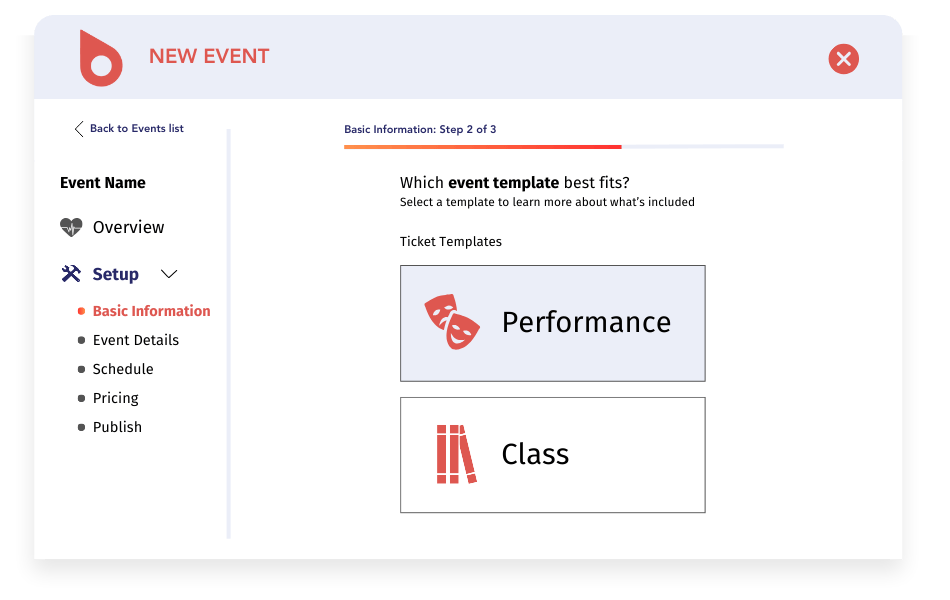
A Story of Success: The Pacific Opera Project
So what happens when a nonprofit finds the right specialized software to manage events? They reach whole new heights! Or in Pacific Opera Project (POP)’s case, a 30% revenue boost.
POP runs multiple shows each season, sells thousands of tickets, and has grown their fundraising—all while using Arts People and Neon CRM to manage their supporters and build a community.
For years, POP loved using Arts People to handle their intricate seating charts and ticketing. But as their fundraising grew, Executive Director Katherine Powers realized the team needed a way to seamlessly connect those ticket buyers with their donor database.
By integrating Arts People with Neon CRM, POP put an end to data silos and manual entry. They gained:
- A Single Source of Truth: Ticket history and donation records sync daily, giving the team a complete view of every supporter without extra steps.
- Smarter Segmentation: Powers can instantly pull reports on loyal ticket buyers who haven’t donated yet, making targeted campaigns a breeze.
- Personalized Stewardship: The team uses relationship-tracking tools to note family connections and personal details, which helps them build genuine bonds with major donors.
With these capabilities, POP estimates their fundraising is up 30% year-over-year.
By letting their technology do the heavy lifting, this small but mighty team stopped fighting with data and started focusing on what they do best: creating accessible, entertaining art for their community.

More FAQs about Event Management Software
Nonprofit event management software pricing depends on the pricing model: some tools charge only per-ticket fees under $1, others charge a monthly subscription, and some charge annual licenses or per-event fees that reach thousands of dollars. To compare options fairly, you can add up subscription costs, per-ticket fees, and payment processing fees. Neon CRM starts at $99 per month, and the events module adds 20% to the base subscription. See Neon CRM pricing for details on modules and onboarding.
Yes. Many event management tools integrate with a nonprofit CRM, and some nonprofit CRMs include event management natively. Neon CRM updates supporter profiles automatically from registrations, ticket purchases, and check-ins, and creates a new contact record when a first-time guest registers. Teams that prefer a separate ticketing or mobile auction platform can connect select platforms through integrations.
A ticketing platform focuses on selling tickets and collecting registrations, while nonprofit event management software covers the full event: planning and scheduling, registration and ticketing, fundraising and donations, communications, and reporting. For nonprofits, the difference matters most after the event, when your team wants attendee and donor data together for follow-up.
Nonprofits can manage galas with table seating, peer-to-peer endurance events like 5Ks and walkathons, classes and workshops, virtual and hybrid events, and volunteer-based community events with Neon CRM. Arts organizations can also use Arts People from Neon One for performing arts ticketing and patron management. For walkathons and other team-based events, you can pair registration with peer-to-peer fundraising in Neon Fundraise.
Nonprofits can measure event success by tracking registration counts, attendance rates, no-shows, revenue by ticket type, and donations separate from ticket revenue, then comparing results year over year. Neon CRM tracks attendance and revenue live during the event and builds post-event reports from the same data, so your team can spot trends before planning the next event. Learn more about Neon CRM’s reporting and analytics features.
Manage Your Events (and Everything Else) With Neon CRM
There is no one-size-fits-all answer to the question, “Which event management solution is right for my nonprofit?” That’s because every nonprofit has different needs and capabilities. When shopping for event management software, keeping your specific needs in mind will guide you toward the best solution for your organization.
That’s why the flexibility of Neon CRM’s event management module makes it such a great fit for nonprofits of all sizes. The new event builder, templates, checkout and check-in interfaces, and ticket exchange capabilities are easy enough for even the least tech-savvy staffer but powerful enough to facilitate a major charity event.
But the best thing about Neon CRM is that it doesn’t just manage events. It manages everything from donors and volunteers to fundraising, communication, and reporting. With Neon CRM, you have a powerful all-in-one platform that can help your nonprofit reach and engage new supporters.
Don’t take our word for it—see for yourself! You have two options: you can click here to take a self-guided tour (at your own pace!) or you can reach out to Neon One directly for a personal demonstration of the platform. We can’t wait to hear from you!