
— KEY TAKEAWAYS
Fundraising automation can take hundreds of year-end tasks off your plate. Five workflows worth setting up: segment appeals with donor personas, automatically send appeals and updates, send pledge or event reminders, create additional donation follow-ups, and send reports to system users.
- If your donor management system has automated workflows, you can use them to maintain your data, engage donors, and streamline your own internal processes with just a few clicks of a button.
- At minimum, segment your donor base into four groups: one-time donors, prospective donors, major donors, and monthly donors. A workflow can assign a “prospective donor” persona to anyone who hasn’t donated but has engaged with you in some meaningful way.
- Automated follow-ups matter most for new donors. If you’ve picked up a new donor during GivingTuesday, this extra outreach is crucial: the retention rate of GivingTuesday donors is notoriously low.
- Automate internal work too. A workflow can email reports to executive directors or board members who don’t use your CRM every day.
Year-end fundraising campaigns require a ton of work, with hundreds of different tasks to complete in the course of your campaign timeline. Luckily, fundraising automation can help you clear some of those tasks off your plate.
If your nonprofit’s donor management system has automated workflows, you can use them to maintain your data, engage donors, and streamline your own internal processes with just a few clicks of a button.
Applying fundraising automation to your year-end campaign will make your workload more manageable. Check out these examples of how Neon CRM’s automated workflows allow you to save time while creating a better donor experience.
Read on to learn five ways fundraising automation can make your year-end giving campaign more efficient. All the examples listed here use Neon CRM Workflows to show you how it’s done.
Neon CRM Workflow Automation Recipe Book
Automated Workflow #1: Segment Appeals with Donor Personas
Want to start building more personalized relationships, but not sure where to start?
Donor personas are reliable and realistic representations of your key audience segments. They can help you create strategies to best engage each type of supporter.
While your organization’s key donor segments will differ depending on your needs, you should at least consider doing basic segmentation by splitting your donor base into four groups:
- One-time donors
- Prospective donors
- Major donors
- Monthly donors
In the example below, a Workflow assigns a “prospective donor” persona to anyone who has not donated but has engaged with the organization in some meaningful way.
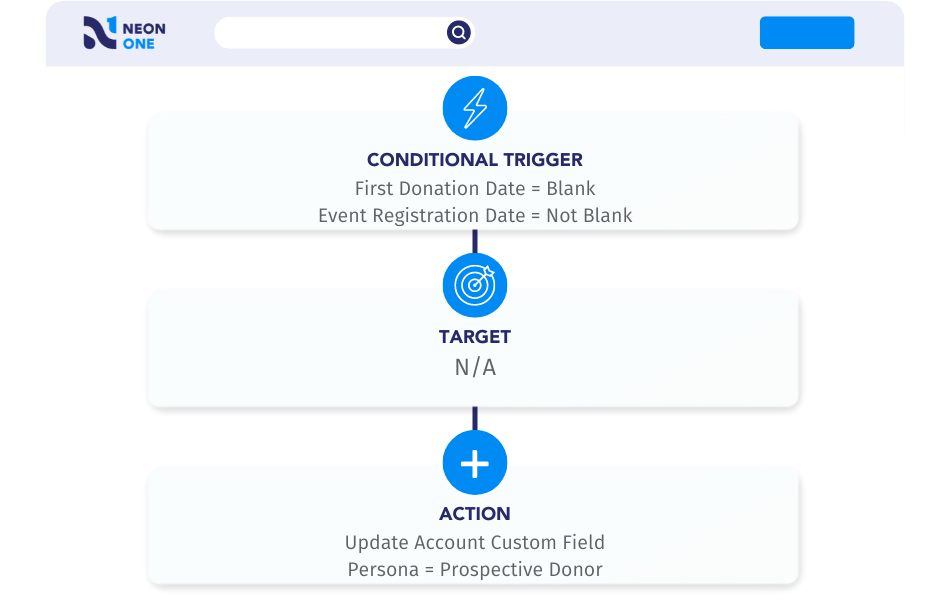
Here’s an additional tip for Neon CRM users: You can create an “if/then” branch to assign different personas within a single Workflow.
Automated Workflow #2: Automatically Send Appeals & Updates
If you’re like most nonprofits, you’ll probably make multiple asks during your year-end giving campaign.
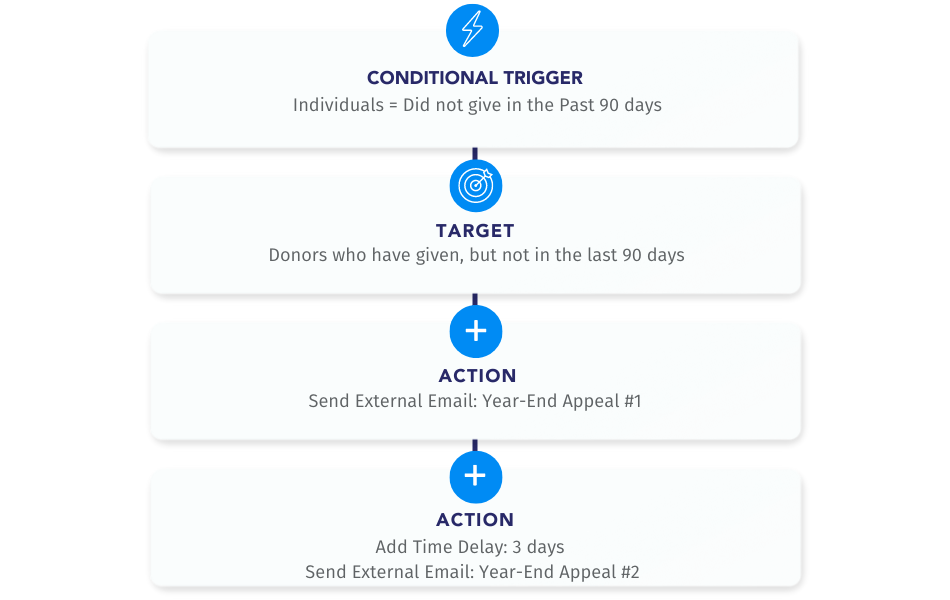
You can use a Workflow to create an email appeal series that engages donors over a specific time frame.
Creating an automated email appeal series with a Workflow is a simpler way to execute a multi-channel fundraising campaign.
Your supplemental emails will help your organization stand out to potential donors during the busy year-end fundraising season, and they will complement your more formal appeal letters in a thoughtful way.
Looking for Better, Safer Ways to Use AI?
The AI Xchange, by Neon One, is a resource hub that helps you use AI efficiently and safely—so you save time without risking donor trust.
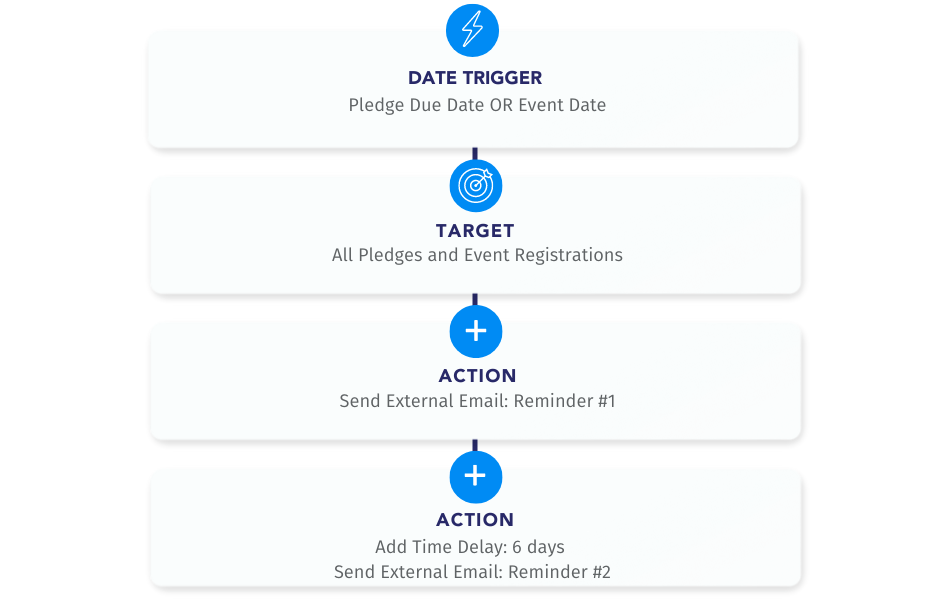
Automated Workflow #3: Send Pledge or Event Reminders
When someone pledges to donate or registers for an event, they’re committing to invest in your mission.
Sometimes, though, life gets in the way, and we need to nudge these supporters to remind them of their commitment.
But those reminders can take up a lot of your time—especially if you’re pulling registration lists manually or balancing a plethora of pledges.
This simple Workflow can take care of that for you by automating reminders.
Automated Workflow #4: Create Additional Donation Follow-Ups
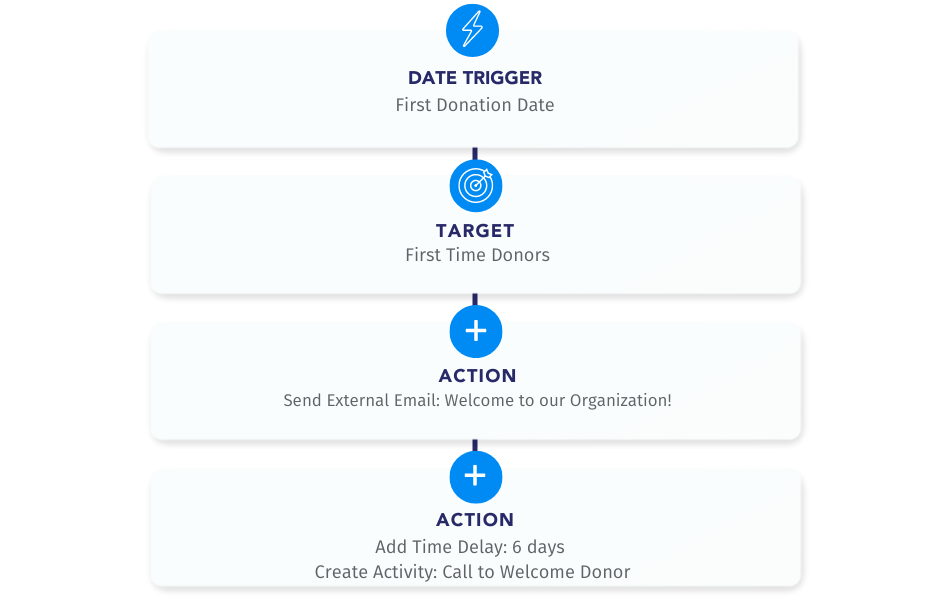
Congrats! Someone just made a donation to your nonprofit.
Whether that gift came from a new person or a long-time supporter, you want to give them a warm “thank you” from your organization outside of the standard system emails.
Go ahead and create a Workflow-based email campaign that sends them a personalized thank-you.
As a part of that campaign, you can also send emails to new supporters welcoming them into your organization and letting them know about all the ways they can get involved.
If you’ve picked up a new donor during GivingTuesday, this extra outreach is crucial: The retention rate of GivingTuesday donors is notoriously low.
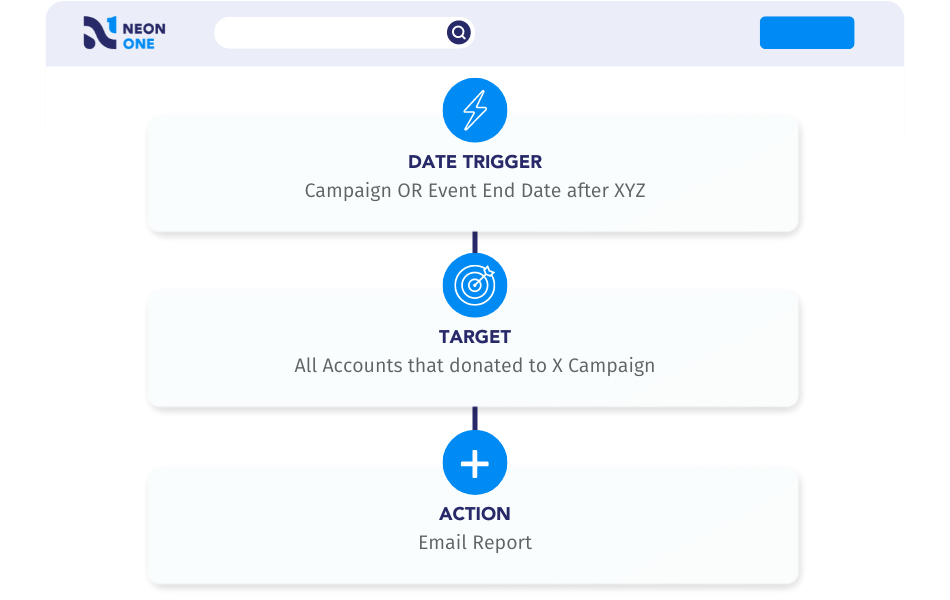
Automated Workflow #5: Send Reports to System Users
Dashboards and reports make it easy to quickly gain insights into your nonprofit’s performance.
To see the success of your campaigns and the impact of your mission, run valuable reports after you wrap up each campaign or event.
You may even want to share these insights with key stakeholders, like your executive directors or board members, who may not use your CRM every day.
You can create a Workflow to automate an internal email to system users and easily share items like reports.
This allows your key stakeholders to be quickly and easily involved in your campaign without manual effort on your part!
Get Your GivingTuesday Templates, Guides, and More!
Neon One’s GivingTuesday Resource Center has all the resources you need to craft an unforgettable campaign and kick off your year-end giving push.
Tour Automated Workflows in Neon CRM
While year-end fundraising campaign needs are different for every nonprofit, we’re confident these fundraising automation tips will help you get more done—and raise more this year!
Workflows are just one of the many features that Neon CRM has on offer to help nonprofits build lifelong relationships with their donors that last well beyond their first gift.
Want to learn more about Workflows in Neon CRM? You can take an easy self-guided tour of the feature right now!