
When you’re a small or early-stage nonprofit, everything is at a premium—including money, time, and resources. If you’re going to invest in a new piece of technology, you need a clear idea of how that tech is going to help you deliver on your mission.
And beyond finding a system that works for you today, you’ll also want a tool that grows with your organization as you reach new donors, serve new clients, and work with new volunteers.
While a CRM can be a great investment for small nonprofits, there are a number of systems out there that—frankly—won’t be a good fit and will decidedly not deliver.
That’s why we sorted through all the options available and have broken down the best CRMs for small nonprofits like yours.
Why Should Small Nonprofits Use a CRM?
As a small nonprofit, you’re focused on delivering programs and services to your clients, growing your donor base, and generally trying to keep dozens of plates spinning in the air at all times. It’s hard!
Investing in a nonprofit CRM might seem like a poor use of resources, but it’s not: The right CRM can help your small nonprofit level up all aspects of your operation. It will allow you to more effectively communicate with constituents, earn more donations and pledges, and even help you manage your events and volunteers.
A nonprofit CRM, strictly speaking, is a database that houses information about all your different constituents. But the best nonprofit CRMs offer a lot more than that. They combine fundraising tools, reporting, email capabilities, membership, and third-party integrations to serve as the nervous system for your organization’s mission.
While most nonprofit CRMs involve spending money, the right one will be money very well spent. If you choose the right CRM, it will more than pay for itself.
Here Are the 7 Best CRMs for Small Nonprofits in 2026
Our team has reviewed the available options and determined that the following seven systems are the best options for small nonprofits.
| Software | Best For | Core Strengths | Pricing Model |
|---|---|---|---|
| Neon CRM | Small–midsize nonprofits ready to grow | All-in-one donor CRM, fundraising, events, volunteers, memberships, automation, unlimited records, revenue-based pricing | Starts at $99/month (revenue-based, no record limits) |
| Bloomerang | Early-stage nonprofits wanting a starter CRM | Easy-to-use donor database, basic reporting, fundraising add-ons | CRM starts at $125/month + add-ons |
| Little Green Light | Cost-conscious nonprofits with CRM experience | Solid donor tracking, memberships, events, lower base price | $45–$135/month (record-based) |
| Bonterra Network for Good | Entry-level fundraising-focused nonprofits | Donor management, email tools, events, basic automation | Custom pricing (quote required) |
| Givebutter | Social-first, campaign-driven fundraising | Peer-to-peer fundraising, events, social tools, fast setup | Tip-based model or 3% platform fee; optional $29+/mo tier |
| Zeffy | Volunteer-led or grassroots nonprofits | 100% donation retention, zero fees, basic fundraising tools | Free (donor-funded) |
| Excel or Google Sheets | Very early-stage nonprofits | Free, flexible, familiar tools | Free (Google Sheets) / Excel license |
1. Neon CRM
Neon CRM is an all-in-one donor management and fundraising platform that helps nonprofit teams do more. With Neon CRM, you can manage your donors, members, fundraising, email campaigns, donation pages, events, volunteers, grants, and reporting, all in one easy-to-use platform. Our system eases the burden of time-consuming manual work so you can focus on what you do best: serving your community.
Key Features
Neon CRM comes with the following features:
- Donor database with highly customizable fields
- Fundraising tools and templates with best practices built in
- Unlimited constituent records
- Unlimited donation forms
- Unlimited users
- Unlimited automated workflows
- Email marketing tools with unlimited emails
- Text Messaging
- Grant Management
- Online Store
- 50+ pre-built reports and intuitive, user-centric dashboards
- Audience segmentation
- Activity Tracking & Prospecting
- P2P fundraising campaign capabilities
- Built-in donor payment processing with Neon Pay
- Free PCI Compliance services with up to $100,000 in data breach protection
- Integrations with over dozens of certified partners, including QuickBooks, Constant Contact, Windfall Data, Eventbrite, and ClickBid.
- Open API to connect your own tool and create a fully custom, integrated tech stack
- Free live chat, email, and phone support for all Neon CRM customers, plus virtual chat agents available 24/7.
Beyond the base CRM, you can add modules for membership management, event management, and volunteer management.
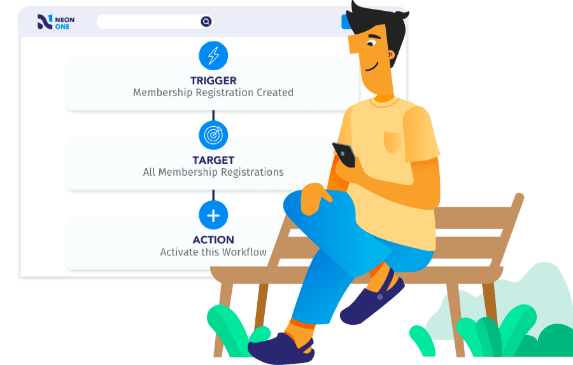
See Neon CRM in Action!
Take a self-guided tour to learn how Neon CRM’s tools empower nonprofits to connect with their communities, move their supporters to action, and simplify their operations.
Price
Neon CRM starts at $99 a month. For that, you get a powerful donor database with fundraising, email, text, automated workflows, peer-to-peer, and reporting and analytics built in.
Beyond those features, you get free Support via live chat, email, and phone support, as well as unlimited users, forms, emails, workflows, campaigns, reports, and records.
For an additional fee, you can add specialized modules for memberships, events, and volunteers. With each additional module you add, you get a discount on those fees.
While most CRMs charge you based on the number of records your organization maintains, Neon CRM uses a revenue-based pricing model with no record limits.
Want the full pricing breakdown for Neon CRM? Click the button below to download our full pricing guide.
Drawbacks
Neon CRM is one powerful piece of nonprofit software, but the downside of all that power is the learning curve for new users. Honestly, it’s a little bit steeper than we’d like—after all, there’s a lot to explore.
That’s why we start with free customer support over live chat, email, and phone. But we don’t end there. We also offer a whole host of learning options, starting with our extensive onboarding program. In addition to our live training functions, we also provide an awesome series of courses through Neon One Academy and an extensive knowledge base you can use to find step-by-step instructions on how to use our features.
Neon CRM Is a Great Fit for Nonprofits That …
…are small or midsize and worry that adding too many supporter records could cause their monthly database costs to increase.
Neon CRM’s revenue-based pricing ensures that the cost of your system won’t outstrip your nonprofit’s overall income, especially as you focus on growing your donor base and email lists. And its memberships module is the perfect answer for smaller nonprofits that rely on member dues.
Neon CRM also includes the ability to create unlimited donation forms. That means you can create unique forms for different campaigns, donor segments, or programs—and, since your donation form is connected to your CRM, your donors’ data is automatically synced to their accounts.
Additionally, Neon CRM is part of a large suite of Neon One products that can help your nonprofit create a unified, enjoyable experience for your supporters. Neon Websites and Neon Pay both integrate seamlessly with Neon CRM, allowing you to collect better data while providing your donors with an enjoyable donation experience.
Want to learn more about Neon CRM? Schedule a private demo to see everything the system can do—and all the ways it can help your nonprofit connect with your community, move your supporters to action, and simplify your operations.
2. Bloomerang

Bloomerang is a donor management system with built-in fundraising, marketing, and reporting features beyond its donor database. In addition to its core product, Bloomerang also acquired the nonprofit CRM Kindful in early 2021 and Qgiv fundraising software in 2024. As the company has worked to expand the features its system offers, that has also led to increases in price.
Key Features
Bloomerang’s standard CRM solution includes the following features:
- Donor database
- Email and Direct Mail marketing
- Reporting & Analytics
- Wealth Screening
- Grant Tracking
- Data Management
- Mobile App
Bloomerang’s Giving+ fundraising solution has the following capabilities:
- Customizable Donations Forms
- Event Management
- Text Fundraising
- Reporting
- Integrations
Here’s what their Volunteer Management package can do:
- Contact Management
- Recruitment
- Screening
- Scheduling
- Attendance Tracking
- Communication & Engagement
- Mobile Apps
- Integrations
Price
Bloomerang has overhauled their pricing structure to better account for their various modules like volunteer management and fundraising.
Let’s start with their nonprofit CRM function. According to Bloomerang’s website, the cost of this system starts at $125/mo.
Finally, Bloomerang’s Giving+ fundraising module starts at $40/mo.
For more detailed information on Bloomerang’s pricing, you can contact their sales staff.
Drawbacks
Bloomerang’s core CRM module is a more streamlined product than many of the others on this list. But, while this means its donor management features are fairly powerful and easy to use, it also means that additional functions—i.e., fundraising, volunteer management, and memberships—will come at an additional cost.
These recent changes to their pricing structure make Bloomerang’s solution less attractive to small nonprofits. In order to get a system that can handle fairly important tasks like fundraising or memberships that sit outside of donor management, you’ll have to pony up for additional modules that likely come with more features than a small nonprofit needs.
Bloomerang Is a Great Fit for Nonprofits That …
… are small, early-stage organizations in need of a beginner CRM. Their streamlined, easy-to-use system will get your team up and running quickly.
But, as your organization grows, the need to juggle additional modules—combined with the steep increases in price that accompany them—might cause issues or force you to look for a new solution in the future.

Which nonprofit CRM matches your needs? Get a data-backed answer
Take this short quiz to get a customized list of CRM vendors that best fit your nonprofit based on budget, size, and functionality needs.
3. Little Green Light
Little Green Light bills itself as an all-in-one donor management software solution with an impressive array of features paired with a lower-than-average price.
Key Features
Little Green Light includes the following features:
- Donor database
- Online donations
- Contact management
- Custom reports
- Membership and volunteer management
- Event tracking
- Grant Proposals
- Unlimited web forms
- Third-party integrations
Price
Little Green Light’s subscription rates are based on your nonprofit’s number of constituent records:
- Up to 2,500 records – $45 /month
- Up to 5,000 records – $60 /month
- Up to 10,000 records – $75 /month
- Up to 20,000 records – $90 /month
- Up to 30,000 records – $105 /month
- Up to 40,000 records – $120 /month
- Up to 50,000 records – $135 /month
For nonprofits with more than 50,000 constituent records, determine the cost of your system by adding $15/mo for each additional 10,000 records.
Little Green Light offers discounts for nonprofits that bill annually rather than monthly. Nonprofits can receive a 10% discount for annual billing and a 5% discount for semi-annual billing.
The system also comes with optional payment processing capabilities via Stripe and PayPal with fees that vary depending on the processor and transaction type.
Drawbacks
Little Green Light offers a lot for a relatively low price, but a number of its features are more limited than what other systems offer. According to customer reviews, the system lacks many of the additional features and capabilities available with other CRM platforms.
Additionally, users report that their system can be complex for CRM newbies to master, and Little Green Light only offers email support. This could make it more difficult to get your system up and running to its fullest potential.
Little Green Light Is a Great Fit for Nonprofits That …
… are small and cost-conscious but have some experience with CRMs. A more experienced system administrator should be comfortable navigating Little Green Light, which means that the cost savings from their lower price point will go further.
4. Bonterra Network for Good
Bonterra’s Network for Good platform is an entry-level fundraising CRM tailored for small nonprofits. It combines donor management, communications, and online giving tools into a package designed to help organizations get started with professional fundraising software.
Key Features
Bonterra Network for Good includes the following core features:
- Donor Database Management
- Customizable Donation Pages
- Email Communication Tools
- Pre-Built Engagement Plans
- Event & Volunteer Management Tools
- Household & Organization Profiles
- Role-Based Collaboration
- Automation Features
- Reporting and Analytics
- Bonterra Que AI Assistant
Pricing
Network for Good is part of Bonterra’s tiered pricing model, but specific costs are not publicly available. Pricing is customized based on your organization’s size, needs, and selected features. The Essentials Plan is the most affordable option, offering the foundational tools smaller nonprofits require to manage their fundraising efforts.
For detailed pricing or to request a custom quote, nonprofits can contact Bonterra directly through their website.
Drawbacks
While the Essentials Plan offers user-friendly tools and a simple onboarding process, there are a few limitations to consider.
Compared to other fundraising CRMs, Bonterra Network for Good’s advanced capabilities, like robust peer-to-peer fundraising tools or AI-driven insights, are reserved for their higher-tier plans.
Meanwhile, the transition from Network for Good into Bonterra’s broader ecosystem has been less than seamless, leading to some uncertainty about the product’s long-term role and development.
Finally, many key features—such as SMS communication, added customer support, and enhanced reporting—may require additional investment, which can add up for smaller organizations.
Bonterra Network for Good Is a Great Fit for Nonprofits That …
… are looking for an affordable, entry-level CRM that focuses on donor engagement, basic fundraising, and event management. Still, while Network for Good built a strong reputation in the nonprofit CRM space, the system’s integration into Bonterra has raised questions about its future direction.
5. Givebutter

Givebutter is a “free-to-use” online fundraising platform that has evolved from a simple donation tool into a more complete fundraising and CRM platform designed for social-first giving.
Key Features
Bonterra Fundraising Essentials includes the following core features:
- Donor CRM
- Marketing tools
- Fundraising pages
- Donation forms
- Fundraising events & auctions
- Payment processing
- Givebutter Wallet
- Mobile app
- Integrations
- Social Tools
Pricing
Givebutter operates on a “tip-or-fee” model. This means that, if you enable optional donor tips, the platform and processing fees are 0%—if a donor doesn’t tip, Givebutter covers the difference. If tips are disabled, a flat 3% platform fee applies across all campaign types.
There is also Givebutter+, which gives you access to more features (And more advanced versions of existing features). The price starts at $29/mo.
Drawbacks
Because Givebutter is optimized for campaigns rather than long-term relationship management, it lacks many features found in full nonprofit CRMs.
Reporting, segmentation, and automation capabilities are relatively limited, and organizations with complex donor stewardship or multi-year fundraising strategies may find the platform restrictive over time.
Additionally, some organizations may find that the “tipping” request creates friction with older or more traditional donor demographics.
Givebutter Is a Great Fit for Nonprofits That …
…are small, just starting out, and looking to primarily handle their fundraising online. It can be especially effective for organizations looking to reach younger donors via social media.
For slightly more established nonprofits (and beyond), Givebutter’s fundraising-first approach and donor “tip” model might prove to be a drag on their efforts to build stronger relationships with their supporters.

Want more great articles like this one?
If you’d like help generating ideas, honing your strategies, and keeping up on the latest trends, you’ll love our monthly nonprofit newsletter.
6. Zeffy
Zeffy is a fundraising and light CRM platform built specifically for small, volunteer-run, and early-stage nonprofits that believe keeping their costs as close to zero as possible is the way to go. Its defining philosophy is simple: eliminate financial friction so more money goes directly to mission delivery.
Rather than positioning itself as a full-scale nonprofit CRM, Zeffy focuses on giving small teams a clean, centralized way to run core fundraising activities without worrying about monthly subscriptions, contracts, or transaction fees.
Key Features
Here are the fundraising and constituent tools that Zeffy bundles together:
- Centralized Contact Records
- Donation Forms & Payments
- Event Ticketing & Check-In
- Peer-to-Peer Fundraising
- Raffles & Lotteries
- Automated Receipts & Thank-Yous
Pricing
Zeffy is completely free to use. There are no monthly fees, no contracts, and no processing fees. The platform is funded entirely through optional contributions made by donors during the checkout experience.
Unlike Givebutter, it does not have a paid “premium” tier that gives you access to additional or enhanced tools.
Drawbacks
Zeffy’s zero-cost model comes with clear limitations. The platform does not offer advanced automation, deep reporting, complex data structures, or extensive integrations typically found in paid nonprofit CRMs.
Organizations with growing fundraising programs, sophisticated segmentation needs, or multi-department workflows may eventually outgrow its feature set.
Some nonprofits also report that the default donor contribution prompt can cause confusion if supporters don’t immediately understand that it’s optional.
Zeffy Is a Great Fit for Nonprofits That …
…are small, grassroots, or volunteer-led and need a straightforward way to accept donations, run events, and manage basic supporter data without spending scarce resources on software or fees. For organizations operating on razor-thin margins, the no-fee model can be very useful.
For more advanced nonprofits (even the ones still operating on super-tight margins), the limitations of the system might lead them to look for an upgrade.
7. Excel or Google Sheets
For nonprofits in their early stages, your “donor database” will probably be a simple spreadsheet through Excel or Google Sheets. And, while spreadsheets are easy to learn, they lack pretty much all the capabilities offered by nonprofit CRM solutions like Neon One or Little Green Light. On the other hand, those spreadsheets are also basically free—which is certainly a plus.
Key Features
The key features of a spreadsheet are mostly determined by your staff’s ability to create and execute formulas. Spreadsheets can do some pretty amazing stuff! But the formulas required to make that magic happen can get extremely complicated. Compared to your average nonprofit CRM, the key features of a spreadsheet database are next to none.
Price
A spreadsheet through Google Sheets is free! An Excel spreadsheet, on the other hand, will need to be purchased through Microsoft.
Drawbacks
The drawbacks here are pretty apparent. In return for little to no cost, you get little to no functionality. And, since donor and giving information will have to be manually entered into the spreadsheet—no automation or integrations here—the likelihood of entering incorrect info due to human error is high.
Google Sheets or Excel Are a Great Fit for Nonprofits That …
… are in their very early stages and need to maintain a donor database at little to no cost.
If you’re working at a nonprofit at this stage in its development, your team is likely operating on razor-thin margins, and investing in a nonprofit CRM probably sounds like a scary proposition. But the right investment in the right solution will grow your giving by far more than the system itself costs to maintain.
Until your organization is ready to make that commitment, we have something to help you get the most from your spreadsheet solution! Check out the section below to learn more.
Build Your Own CRM Using This Donor Database Template
If your nonprofit is using a spreadsheet for your donor database, you’re in luck: Neon One has created a free donor database template for Excel and Google Sheets that comes complete with its own built-in dashboard.
Our donor database template allows you to do the following:
- Manage constituents’ details
- Track transactions
- Record performance for different funds, campaigns, and appeals
- Standardize your data
- Review important metrics in a built-in dashboard
If your organization is in its early stages, this template will help you avoid the common pitfalls that come with setting up your own database in Excel or Google Sheets. If you’d like to download the template, just visit the page below!

FAQs About CRMS for Small Nonprofits
The best CRM for a small nonprofit is one that fits your current size, budget, and staff capacity—while still allowing you to grow. For many small nonprofits, that means choosing either a purpose-built nonprofit CRM with fundraising tools built in, or starting with a structured donor database template if you’re not ready for full software yet. The right choice is the one that reduces manual work, improves donor relationships, and doesn’t outpace your team’s ability to manage it.
Yes—once you’re tracking more than basic donor names and gift amounts, a CRM becomes essential. A nonprofit CRM helps centralize donor data, automate receipts and follow-ups, manage events and volunteers, and reduce the risk of losing information when staff or volunteers change. Even very small teams benefit from having a single source of truth instead of scattered spreadsheets and inboxes.
If your organization is in its earliest stage or operating on extremely tight margins, starting with a well-designed donor database template can be a smart first step. Templates help standardize data, track donations, and avoid common spreadsheet mistakes—while preparing your organization for an eventual transition to a full CRM when you’re ready.
Small nonprofits should prioritize tools that save time and prevent data chaos. The most important features usually include a centralized donor database, online donation forms, automated receipts, basic reporting, email or communication tools, and the ability to grow without sudden cost increases. Advanced features are only valuable if your team has the capacity to use them.
Free or zero-fee platforms can be helpful for basic fundraising, especially for volunteer-led organizations. However, they often lack deeper reporting, automation, integrations, and long-term data management features. Many nonprofits eventually outgrow free tools and move to a dedicated CRM once fundraising becomes more complex.
If you’re manually entering donations, struggling to track donor history, missing follow-ups, or worried about losing data when someone leaves your organization, it’s time to consider a CRM. Spreadsheets work early on, but they don’t scale well—and the hidden cost is staff time and lost opportunities.
Ease of use comes down to intuitive design, built-in nonprofit best practices, and minimal setup requirements. The best CRMs for small nonprofits don’t require a dedicated IT staff or outside consultants to get value. They help teams spend less time managing data and more time building relationships with donors.
Some CRMs are designed specifically to grow alongside small and midsize nonprofits, offering more automation, reporting, and integrations as your fundraising matures. Choosing a system with flexible pricing and no hard limits on contacts or users can prevent painful migrations later.
Centralized systems—whether a CRM or a standardized donor database template—are critical when leadership or volunteers change frequently. They ensure donor history, event data, and institutional knowledge stay with the organization instead of walking out the door with the last board treasurer.
If your nonprofit is still very early-stage, starting with a structured donor database template can help you build good data habits without financial risk. If you’re actively fundraising and ready to save time, reduce errors, and strengthen donor relationships, a purpose-built nonprofit CRM like Neon CRM is often the most sustainable long-term solution for small teams.