

If you only have a minute, here is the bottom line: A CRM for charities can be a game changer. The right CRM will bring donor, volunteer, and event data into one place so you can stop wrestling with messy spreadsheets. In this guide, we’ll focus on helping you find a platform that balances essential features with a user interface that your staff will actually enjoy using.
Running a charity is hard. For most organizations—especially small or midsize ones—it can feel like a constant battle to raise enough money while working with not enough resources to deliver on your mission. Any help you can get is more than welcome.
That’s where a charity CRM can be a total game-changer. By unifying all your supporter data in a single system, simplifying your operations through workflow automation, and providing you with the tools to build personal relationships, refine fundraising strategy, and track key performance indicators, a charity CRM could very well be the thing that puts your organization on the path to long-term success.
Of course, success is not really about using any old CRM. It’s about using the right CRM for you and your work. That’s what we’re here to help you with.
In this article, we’ll cover the benefits and key features of charity CRMs, eight of the top solutions currently available and how to shop for them, and some tips on how to implement a new CRM at your charity.
Table of Contents
- Understanding CRMs for Charities
- 8 Key Features for Charity CRMs
- Your Charity CRM Buyer’s Guide
- 9 Top Charity CRM Solutions
- A Brief Guide to Implementing Your New Charity CRM
- Take Our Quiz to Find Your Charity’s Best CRM Fit
There’s a lot of ground to cover. So let’s get started!
Understanding CRMs for Charities
At its core, a CRM system is a database that allows organizations to effectively manage and analyze interactions with their constituents. For for-profit companies, that generally means their customers. For charities, it means their donors, volunteers, event attendees, and other kinds of supporters.
CRMs centralize data from various channels, providing a comprehensive view of a donor’s journey, volunteer engagement, event attendance, etc. This holistic approach to data management is crucial for charities, where relationships are the backbone of sustained support and success.
There are three main ways that charity-specific CRMs differ from their for-profit counterparts:
- Industry-Specific Features: In order to serve the unique needs of nonprofit organizations, charity CRMs are designed with specific functionalities for donor management, fundraising campaigns, grant tracking, volunteer scheduling, and event planning. Many also come with email communication tools.
- Compliance: Charities in both the U.S. and Canada are subject to many of the same laws and regulations as for-profit companies, while also being subject to some sector specific requirements. That’s why charity CRMs are built with features designed to support these unique compliance needs.
- Pricing: The distinction between commercial and nonprofit CRMs also extends to their pricing models, with many charity-specific CRMs sporting lower price points (or a nonprofit discount) versus comparable for-profit models.
As we’ll explore in depth in the next section, the value of charity CRMs extends beyond simple data management. Implementing the right system can be a catalyst for deepening relationships, optimizing fundraising efforts, and driving mission-centric growth.
Here’s What The Right CRM Can Do for Your Charity
As we dive into all the ways that a CRM can help your charity reach the next level, it might be helpful to think about things in terms of two stakeholder buckets: supporters and staffers.
A CRM will benefit donors, volunteers, board members, and event attendees—your supporters—through features like easy-to-use forms, personalized communications, and organization that allows you to tackle your mission more efficiently. Board members, specifically, will also benefit from improved reporting.
For staffers, the benefits of a CRM will come through features like automation of time-consuming manual tasks, all-in-one capabilities and integrations that route all your data to the same place, and analytics that allows them to double down on what’s working and reevaluate what isn’t.
Here are some of the core ways that a CRM can help your charity.
- Centralized Data Management: Instead of having donor information, fundraising records, and operational data scattered across various spreadsheets and databases, a CRM consolidates all this information into a single accessible platform. This central repository allows for more effective analysis and reporting—and it also makes it easier for staff to retrieve and update information, reducing the risk of inconsistencies or data loss.
- Personalized Donor Communications: A CRM system should analyze donor information and allow you to create audience segments that they can use to personalize their communications. It helps you make sure that your message resonates with the individual donor. By tailoring your communication to match the unique interests and engagements of your donors, you make them feel valued and understood. That can then help you forge a deeper connection with your community and ultimately get even more support from them.
- Targeted Fundraising Campaigns: CRM data is invaluable for designing fundraising campaigns that appeal to specific segments of your donor base. For instance, you can take a segment of donors who have consistently supported education initiatives from your charity and send them a customized campaign focused on a new scholarship program. This targeted approach increases the relevance of your message, and that boosts the likelihood of a positive response and a successful campaign.
- Automating Administrative Workflows: When it comes to streamlining your day-to-day operations, one of the biggest advantages a CRM can offer is the automation of routine tasks like data entry, donation processing, and sending out acknowledgement emails. By automating these processes, a CRM reduces the risk of human error and frees up staff time to focus on the work that takes human touch. This increased efficiency can improve your team’s productivity and overall effectiveness.
- Integrating Event, Volunteer, and Grant Management: A comprehensive CRM system can integrate various operational aspects of your charity’s work, such as event management, volunteer scheduling, and grant tracking. Combining all of these features into a single system ensures that information is centralized and easily accessible, which facilitates better coordination and planning across your organization’s different teams.
By streamlining your charity’s operations and implementing more targeted, data-backed donor management and fundraising strategies, you’ll be able create a feedback loop that benefits your staff members, your supporters, and—most of all—your mission.
The Real World Impact of Charity CRMs
The impact of a well-implemented CRM system on a charity’s success cannot be overstated.
And while we could throw a bunch of data and studies at you, we thought it would be better to show you a real world example of how implementing Neon CRM changed the game for our customers.
Click the story below to learn how Science Olympiad took their contacts list from 140 when they implemented Neon CRM to 30,000, plus scaled their communications, automations, and engagement, in only a few years.
You can check out all our customers stories here.

8 Key Features for Charity CRMs
The top CRMs for charities all offer a suite of features tailored to the unique needs of the nonprofit sector. These features not only streamline administrative tasks but also empower charities to engage more effectively with their supporters.
Here’s a comprehensive overview of the seven primary features that best charity CRMs will include:
1. Donor Management
The core functionality of any charity CRM is donor management. This feature allows charities to create and maintain comprehensive profiles for each donor, including contact information, donation history, and communication preferences.
The basic building blocks of donor management are the donor profiles that are stored within your CRM’s database. Those profiles should all include the following information:
- Contact Information Storage: Store and manage donor contact details, including names, addresses, phone numbers, and email addresses. Bonus points if you can also take personal notes into your system to help you remember the little details that matter when relationship building (birthdays, family members, etc.).
- Donation Tracking: Record and track each donor’s transaction history, including amounts, dates, payment methods, and transaction type (donation vs. event tickets, membership dues, etc.).
- Communication Preferences: Maintain preferences for communication channels (email, phone, mail) and frequency to ensure personalized outreach.
By having all this data in one place, organizations can personalize their interactions, track donor engagement, and identify opportunities for further outreach.
2. Fundraising
CRMs for charities often include tools for planning, executing, and analyzing fundraising campaigns. In fact, this functionality is such a core feature that you’ll often hear CRMs classified as “fundraising software.”
With fundraising features in their CRM, charity organizations should get the following:
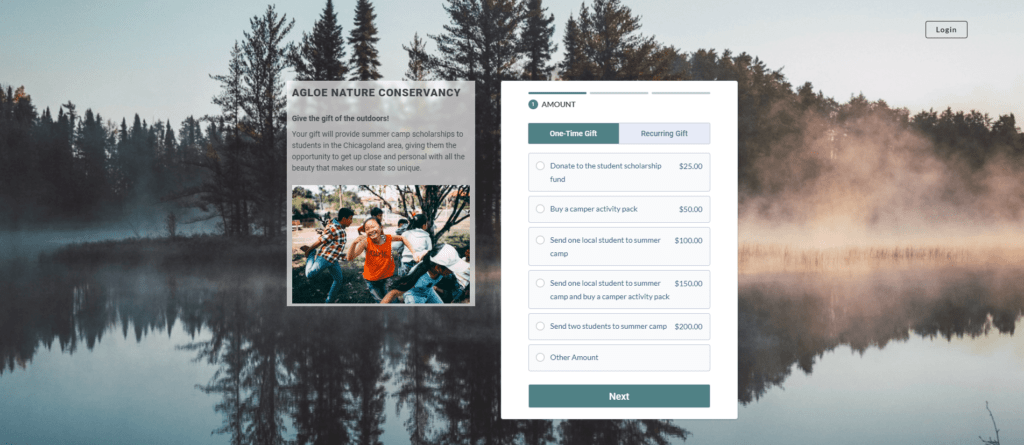
- Online Donation Pages: Charities can easily set up customizable donation pages for online giving, with options for one-time or recurring donations and multi-step forms optimized to improve conversion rates.
- Campaign Tracking: Organizations can monitor the progress of fundraising campaigns in real time, including funds raised, donor participation, and goal attainment.
- Donor Segmentation Tools: Segmenting donors based on criteria such as donation amount, frequency, or interests provides the foundation for targeted campaign outreach.
3. Communication & Marketing
Effective communication is vital for building and maintaining strong relationships with your supporters.
CRMs for charities often include email marketing tools, allowing organizations to send updates, appeals, and invitations.
Some of the most communication features include:
- Email Campaigns: Create and send email campaigns to donors, volunteers, and other contacts, with options for customization and personalization.
- Automation: Set up automated communication triggers based on donor actions, such as sending a thank-you email after a donation.
- Social Media Integration: Connect your CRM to social media platforms for coordinated posting and engagement tracking.
If you want to see how Neon CRM’s easy-to-use email builder can level up your digital communications, take this self-guided tour!
4. Event Management
Charities frequently organize events for fundraising, awareness, or community engagement. CRM systems can support event management by handling registrations, ticket sales, and attendee communications.
Additionally, post-event analysis tools help organizations assess the success of their events and make data-driven decisions for future planning.
Event management tools usually cover (at least) the following areas
- Event Registration: Manage event registrations, including ticket sales, attendee information, seating arrangements, and payment processing.
- Attendee Communication: Send automated confirmations, reminders, and follow-up messages to event attendees.
- Event Analytics: Analyze event performance through metrics such as attendance rates, revenue generated, and attendee feedback.
If your charity holds a lot of classes, those are a very specific type of recurring event that can be a hassle to manage using a one-size-fits-all events tool. That’s why Neon CRM’s events module has a dynamite feature specifically designed for managing classes.
You can learn more about managing classes in Neon CRM by reading the article below:

5. Volunteer Management
Managing volunteers is another critical aspect of charitable operations. Many charity CRMs offer volunteer management features, such as scheduling shifts, tracking volunteer hours, and communicating with volunteers about upcoming opportunities.
Some of the most common volunteer management features include:
- Shift Scheduling: Organize and schedule volunteer shifts, allowing volunteers to sign up through custom-built forms for available time slots.
- Volunteer Profiles: Maintain detailed profiles for each volunteer, including contact information, skills, and availability.
- Hour Tracking: Record and track volunteer hours contributed to the organization for recognition and reporting purposes.
- Volunteer Communication: Send reminders, updates, or thank you notes to your volunteers.
These features streamline the process of coordinating volunteer efforts and ensure that both the organization and its volunteers have a positive experience.
6. Reporting & Analytics
Data-driven decision-making is essential for any successful nonprofit—and it only becomes more essential with each passing year.
But data is only as good as the tools you have on hand to analyze it.
That’s why charity CRMs should include robust reporting and analytics capabilities that enable organizations to track key metrics like donor retention rates, campaign performance, and fundraising trends.
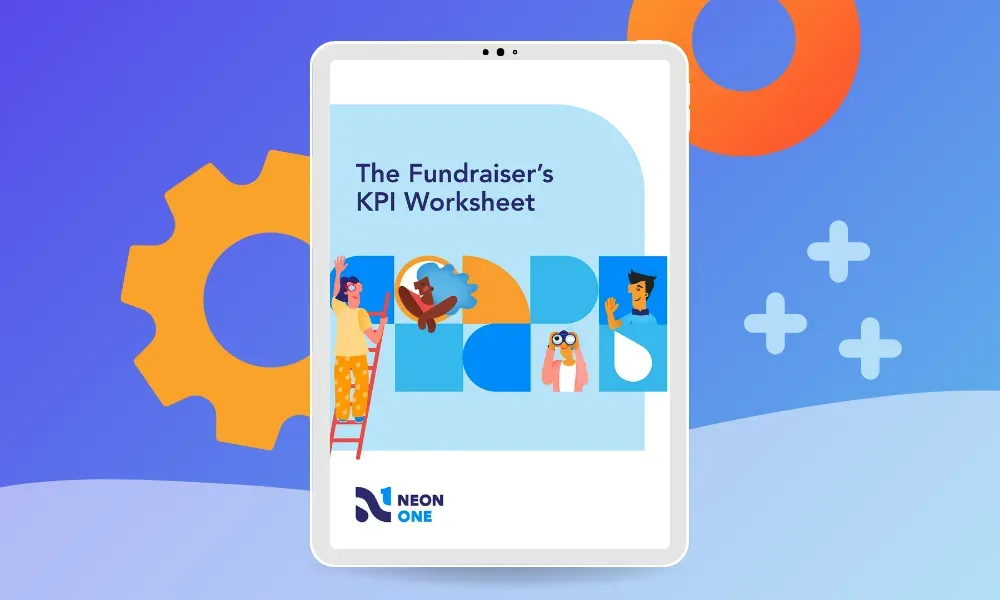
- Dashboard: Access a centralized dashboard with key metrics and performance indicators for quick insights into organizational health.
- Custom Reports: Generate custom reports on various aspects of the organization, such as fundraising trends, donor retention, and volunteer participation.
- Data Export: Export data for further analysis or for use in other software tools, such as spreadsheets or data visualization software.
The importance of these tools can’t be emphasized enough. The insights you can gain from them can have a huge impact on everything from your strategic planning to how you format donation forms or thank-you emails.
Data-driven decision making is here to stay. Embrace it!
7. Integration with Other Tools
One of the great advantages to using a charity CRM is to have an all-in-one solution. But it’s rare that any CRM can truly do everything your nonprofit needs to accomplish.
This is why most CRMs for charities offer robust integrations with other software tools, like accounting systems, payment processors, wealth screening platforms, and more.
Here’s a little bit more about some of the key integrations you will probably implement with your CRM.
- Payment Processing: Integrate with payment gateways for secure processing of donations and event registrations.
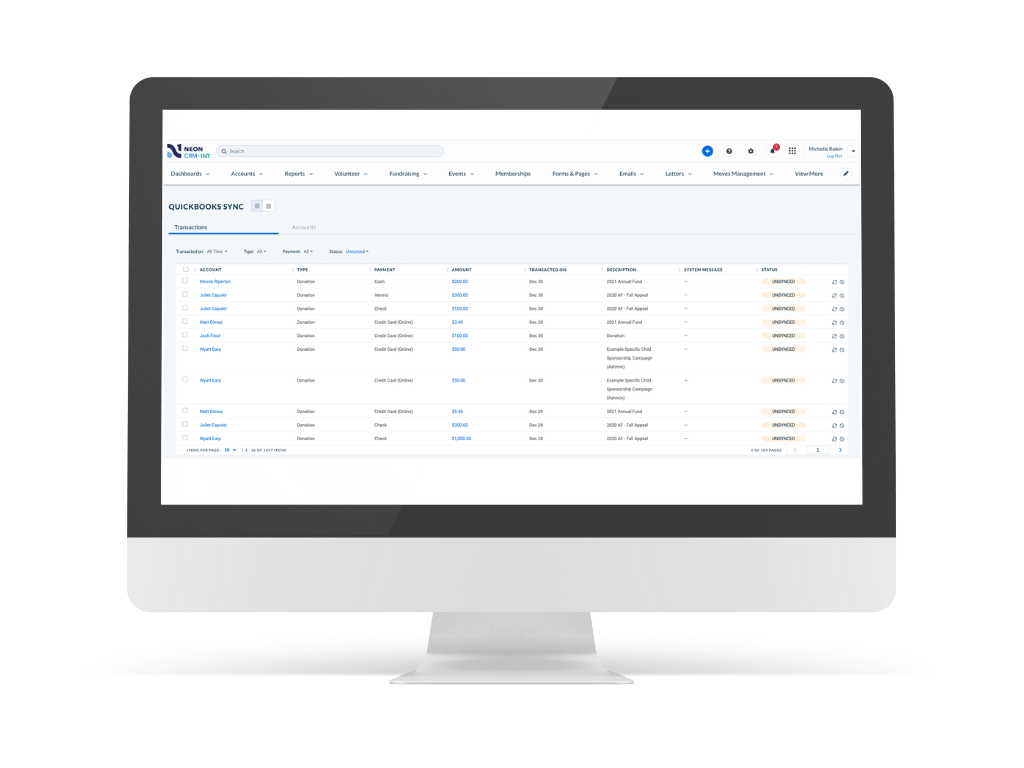
- Accounting Software: Connect with accounting software for seamless financial tracking and reporting.
- Third-Party Apps: Integrate with other third-party applications, such as email marketing platforms, survey tools, or project management software, for a cohesive ecosystem of tools.
These seamless integrations ensure that data flows smoothly between your charity’s different systems, reducing the need for manual data entry and minimizing the risk of errors. You can read the full list of Neon CRM’s partner platforms here.
However, integrations also usually mean some lag time as information moves from system to system. That’s why we want to highlight that Neon CRM comes with its own built-in payment processor, Neon Pay, that allows you to track financial data in real time.
And when it comes to accounting software, did you know that Neon CRM offers an especially robust integration with Quickbooks Online as an Intuit Quickbooks Solution Provider? You can read more about it in the article below:
8. AI Insights
You can’t talk about CRMs today without talking about AI and how companies are leveraging AI to make their systems better. In the world of charities, AI in your platform should serve one simple purpose: Making your life easier so you can focus on people. As you shop for a CRM, you’ll likely see AI features integrated directly into the platform:
- Predictive Giving Insights: Instead of guessing who might become a monthly donor, some CRMs use AI to analyze past behavior and identify supporters who are most likely to increase their gift or sign up for a recurring plan.
- Smart Assistance: We’ve all stared at a blank screen trying to write a thank-you email or struggled to try to find a quick summary of information on a donor. Modern CRMs often have built-in writing assistants that can help you draft personalized appeals or summarize a donor’s entire history into a brief.
- Automated Data Hygiene: One of the biggest CRM headaches is duplicate records. AI-driven systems can now work in the background to identify and merge duplicates, fit formatting errors, and keep your database healthy.
Your Charity CRM Buyer’s Guide
Finding the perfect CRM for your charity means first mapping out what your charity needs in a donor management system. It’s kind of like dating: If you don’t know what you want in a partner, how could you ever hope to find the right one?
Among other things, the ideal CRM should fit within your budget, integrate with (or replace) your existing systems, and pair well with your staff’s technological expertise. And perhaps more importantly, your CRM should not only meet your organization’s current needs but also be able to adapt to its evolving requirements.
Before you start shopping for a charity CRM in earnest, it’s essential to take a step back and evaluate the specific needs of your charity. Sit down with your team and consider the following questions:
- What are your primary goals for using a CRM? Are you looking to improve donor management, streamline fundraising efforts, or enhance volunteer coordination?
- What size is your organization? The complexity and scale of the CRM should match the size of your charity and your donor base.
- What is your budget for a CRM? Determine how much you can afford to spend on a CRM, keeping in mind both upfront costs and ongoing expenses.
- What kinds of customization will you require? The CRM should be flexible enough to tailor its features and workflows to your charity’s unique processes. This includes custom fields, forms, and reports that reflect your specific data requirements.
- How will your needs change as you grow? Choose a CRM that can grow with your organization. It should be able to handle an increasing number of contacts, more complex data, and additional users without slowing your system down.
- What other systems will your CRM need to integrate with? A good CRM should seamlessly integrate with other tools and platforms your charity uses, such as accounting software, email marketing services, and payment processors. Not all CRMs integrate with all other tools, so pay attention to this.
- How technologically savvy is your staff? The CRM interface should be intuitive and easy to navigate, even for users with limited technical skills. A steep learning curve can lead to low adoption rates among your staff and volunteers. Give some extra weight to the experiences of the staff members who will be using the system the most—and make sure you account for a CRM’s customer and technical support services as well.
Once you have answered all these questions, you’ll be ready to start shopping around for a charity CRM. In the next section, we’ll briefly touch on some of the top options available.

9 Top Charity CRM Solutions
The buying process for a charity CRM is a long one. You’ve got to do research on all the available options, set up product demos, and go back and forth with your staff and your board before finally making a decision. It’s a lot of work!
To help get you started, we’ve put together a list of the top charity CRMs available in the U.S. and Canada, along with some links where you can learn more about them.
- Neon CRM
- Salesforce Nonprofit Cloud
- Blackbaud Raiser’s Edge NXT
- DonorPerfect
- Keela
- Little Green Light
- Bonterra
- Bloomerang
- Givebutter
| Charity CRM | Who They’re Best For | Summary of Platform |
|---|---|---|
| Neon CRM | Small and midsize nonprofits looking for a system that lets them level up their game and any nonprofit that has a robust membership program. | Fully integrated to manage fundraising, relationships, events, communications, website, payment processing, and reporting all in one place. |
| Salesforce Nonprofit Cloud | Medium to large nonprofit organizations with complex needs looking for a robust, scalable CRM solution | Comprehensive platform to manage large-scale operations with deep integrations and advanced features that allow for lots of customization. |
| Blackbaud Raiser’s Edge NXT | Larger charities and educational institutions that require a comprehensive suite of services | Cloud-based system is known for its advanced fundraising and donor management capabilities that provide a holistic view of donor relationships and sophisticated analytics |
| DonorPerfect | Midsize charities that are primarily using a CRM to streamline their fundraising and enhance their donor engagement | System comes with a wide array of tools that facilitate engagement, from tracking donations and automating key fundraising tasks to running events, processing payments, and communicating with your supporters |
| Keela | Small and midsize charities that value ease of use and relative cost-effectiveness | A balance of affordability with essential features for fundraising, donor management, and email marketing |
| Little Green Light | Small nonprofits seeking an affordable, streamlined CRM solution that’s fairly adaptable to various nonprofit types | Supports donor management needs of with a streamlined set of features that cover contact management, fundraising, event management, and reporting |
| Bonterra | Small charities that are keen on developing their fundraising strategies or larger nonprofits who are particularly focused on organizing their supporters for collective action | A solution that give smaller organizations a tool to enhance their fundraising operations, plus additional capabilities that focus on supporter engagement. |
| Bloomerang | Small to midsize charities focusing on general donor retention and engagement | Emphasized features that assist with donor retention and engagement, helping organizations better understand their donor base through features like reporting, email marketing, and donor feedback surveys |
| GiveButter | Small to midsize charities that want an easy-to-use system without a heavy monthly overhead | Easy-to-use system that is especially powerful for organizations that rely on high-engagement campaigns like peer-to-peer “thons” or live auctions. |
1. Neon CRM
Neon CRM is—in our humble and in no way biased opinion—the best charity CRM on the market. Our system offers comprehensive donor management, fundraising, and member engagement tools alongside event and volunteer management, grants, and analytics features. and member engagement features. It’s truly an all-in-one system.
Pricing: Neon CRM stands out from the pack because we charge based on your revenue, not your number of records. We only charge more as you raise more. Neon CRM’s starting price is $99/mo; and we have additional modules for Events, Memberships, and Volunteers. Download our full pricing guide here.
Who is Neon CRM Best For? Neon CRM is a CRM for nonprofits of all sizes, but is probably best for small and midsize nonprofits looking for a system that lets them level up their game and any nonprofit that has a robust membership program.
2. Salesforce Nonprofit Cloud
Salesforce is the biggest CRM provider on the continent, and Salesforce Nonprofit Cloud is a version of their CRM solution tailored specifically for the unique needs of charity organizations. Built on the Salesforce platform, it offers a range of features with tools for fundraising, program management, marketing, and engagement. One of the system’s biggest selling points is its customizability.
Pricing: The first 10 subscriptions to the Salesforce Nonprofit Cloud are provided for free as part of Salesforce’s Power of Us program. From there, the Enterprise Edition of the system starts at $60/mo for each user, while the Unlimited Edition starts at $100/mo per user. subscriptions and advanced features may incur extra costs.
Who is Salesforce Best For? Salesforce Nonprofit Cloud is an ideal fit for medium to large nonprofit organizations with complex needs looking for a robust, scalable CRM solution. Smaller organizations or those with limited technical resources may find the platform to be more complex and resource-intensive than they need.
3. Blackbaud Raiser’s Edge NXT

Raiser’s Edge NXT is the latest in a long line of donor database software solutions from Blackbaud. The cloud-based system is known for its advanced fundraising and donor management capabilities. It aims to be a comprehensive constituent management solution, providing users with a holistic view of donor relationships and sophisticated analytics for strategic decision-making, and a ton of add-ons.
Pricing: Pricing is based on the size and needs of the organization. Contact Blackbaud for a customized quote.
Who is Blackbaud Raiser’s Edge NXT Best For? Blackbaud is best suited for larger charities and educational institutions that require a comprehensive suite of services. Its extensive features and customizable solutions cater to complex operational needs and multi-channel campaigns, but smaller organizations will probably find the system’s complexity cumbersome and the price too high.
4. DonorPerfect

DonorPerfect is engineered to support small and midsize charities in optimizing their fundraising efforts and managing donor relationships. To that end, the system comes with a wide array of tools that facilitate engagement, from tracking donations and automating key fundraising tasks to running events, processing payments, and communicating with your supporters.
Pricing: DonorPerfect has three different packages available—Core, Plus, and Pro—based on the features a given nonprofit requires. For a customized quote, you should contact DonorPerfect directly.
Who is DonorPerfect Best For? It’s best suited to midsize charities that are primarily using a CRM to streamline their fundraising and enhance their donor engagement. Conversely, very small nonprofits or volunteer-run groups might find its array of features offer more than they need, while larger organizations might find that it doesn’t offer them quite enough.

5. Keela
Keela offers a user-friendly CRM solution that is particularly well-suited to smaller charities looking to balance affordability with essential features for fundraising, donor management, and email marketing. Among its notable features are e-cards, Smart Ask functionality, peer-to-peer fundraising pages, and an in-house payment processor, KeelaPay
Pricing: Keela’s pricing starts at $160 per month, with all price points offering an additional discount for charities who pay annually. Prices are based on the number of contacts and features needed.
Who is Keela Best For? Keela is tailored for small and midsize charities that value ease of use and relative cost-effectiveness, with a solid lineup of features that cover fundraising, database management, and communications. But its price points are still higher than several other comparable systems without necessarily offering that much more. Larger nonprofits or those with specialized or complex CRM needs will likely find that Keela doesn’t support their operations.
6. Little Green Light
Little Green Light is a CRM aimed at supporting the donor management needs of small charities with a streamlined set of features that cover contact management, fundraising, event management, and reporting. Little Green Light can be used to create donation pages, track grant proposals, and segment your database, all within a system that prizes ease of use and affordability over offering a comprehensive suite of tools.
Pricing: Little Green Light starts at $40.50 per month for charities that bill annually ($45/mo for those who bill monthly) with plans based on the number of constituents.
Who is Little Green Light Best For? Little Green Light serves small nonprofits seeking an affordable, streamlined CRM solution that’s fairly adaptable to various nonprofit types. Larger organizations or those with highly specialized operational requirements, however, might find Little Green Light’s features insufficiently comprehensive.
7. Bonterra
Bonterra Fundraising & Engagement is actually based on two legacy systems: Network for Good and Every Action. It’s basic Essentials package utilizes the Network for Good solution to give smaller organizations a tool to enhance their fundraising operations. Meanwhile, it’s Pro and Enterprise solutions utilize Every Action’s capabilities to offer a more robust set of features, with a particular focus on supporter engagement.
Pricing: Contact Bonterra for pricing information.
Who is Bonterra Fundraising & Engagement Best For? Bonterra is best for small charities that are keen on developing their fundraising strategies or larger nonprofits who are particularly focused on organizing their supporters for collective action. However, any nonprofits outside those two relatively narrow bands (like smaller orgs that need a more robust system or large ones that don’t rely on organizing their supporters) might find the system less valuable.
8. Bloomerang

Bloomerang’s CRM platform is tailored to small and midsize charities, emphasizing features that assist with donor retention and engagement. The goal of the system is to help organizations better understand their donor base and build lasting relationships through features like reporting, email marketing, and donor feedback surveys. Bloomerang’s condensed tool suite can be expanded with add-ons that cover fundraising, volunteer management, and payments.
Pricing: Bloomerang’s basic CRM starts at $125 per month, and you can add on additional modules. Their Giving+ fundraising module (utilizing tools from Qgiv, which they acquired in early 2024) starts at $40/mo, their volunteer management system starts a $119/mo, and their membership module starts at $25/mo.
Who is Bloomerang Best For? Bloomerang is designed for small to midsize charities focusing on general donor retention and engagement, as it offers insights into donor behavior and trends (adding additional modules to expand the system’s capabilities might make it too expensive). For very large nonprofits and organizations in need of highly specialized industry-specific features, Bloomerang’s more streamlined, generalist system might not be enough.
9. Givebutter
Givebutter is an all-in-one fundraising and CRM platform that has gained popularity for its modern, social-first approach. It combines a donor database with built-in tools for peer-to-peer fundraising, events, and auctions, aiming to make giving feel fun and interactive.
Pricing: Givebutter offers its core platform—including the CRM, fundraising pages, and events—for $0/month. Instead of a subscription fee, they rely on donor tips. If you prefer to disable tipping, they offer a transparent “Platform Fee” model. Givebutter also offers a “Plus” package that starts at $29/month.
Who is Givebutter Best For? Givebutter is a good for small to midsize charities that want an easy-to-use system without a heavy monthly overhead. It is especially powerful for organizations that rely on high-engagement campaigns like peer-to-peer “thons” or live auctions. However, larger organizations with highly complex moves management needs or those that require integrations might find the “all-in-one” simplicity a bit restrictive.
Want to Learn More About These Systems?
We know. We just threw a lot at you. Here’s the thing, though: We barely scratched the surface of these systems. For a more in-depth look at these systems (well, most of them, anyway), check out this comparison:
A Brief Guide to Implementing Your New Charity CRM
Signing up for a brand new CRM sure can feel exciting. Bringing this new technology to bear on your charities day-to-day operations is obviously going to be a real game changer!
Not so fast. First, you have to implement the system. That’s going to mean migrating your data, training your staff, and then ensuring that everyone continues to use the system to its fullest potential.
It’s not going to be easy, but we promise that a successful CRM implementation will be worth its weight in gold. Here’s a brief guide to help you get started.
Follow These CRM Adoption Best Practices
You should plan on any new CRM you implement encountering some amount of resistance amongst your staff. People just don’t like learning new systems, it’s as simple as that. And it’s up to you to help your staffers get past that.
Start by following these best practices to guide your implementation process. :
- Involve Your Stakeholders: Engage staff, volunteers, and even carefully selected donors in the planning process to ensure their needs and concerns are addressed.
- Clearly Define Objectives: Identify specific goals for the CRM system, such as improving donor engagement, streamlining operations, or increasing fundraising effectiveness.
- Provide Comprehensive Training: Provide thorough training sessions covering all aspects of the CRM system, from basic navigation to advanced features. The CRM you choose should have these available for you and your team.
- Offer Ongoing Support: Make sure people know how to access continuous support through help desks, online resources, and regular check-ins to address any issues or questions.
- Encourage Regular Feedback: Create channels for staff to provide feedback on their experience with the CRM, allowing for adjustments and improvements.
By bringing these practices to bear on your CRM implementation, you are going to gain buy-in from your staffers, which will translate to a higher ROI from this new technology.
The better your staff can wield your CRM, the more everyone involved in your charity—from the communities you serve to the donors and volunteers who support you—will benefit.
CRM Implementation Starts with Data Migration
In the previous section, we addressed the people side of your CRM implementation. Now it’s time to address the technical side.
Data migration is the process whereby you transfer existing donor and operational data into the new CRM, ensuring accuracy and completeness. A successful data migration is absolutely crucial to your CRM implementation.
Why? Because a well-executed data migration minimizes the risk of data loss or errors, preserving the integrity of your valuable information. It sets a solid foundation for your new CRM, thereby setting your charity up for long-term success.
You can read more about data migration—and how we approach it at Neon One–in this blog post:

Take Our Quiz to Find Your Charity’s Best CRM Fit
Okay, is that everything? Shockingly, it isn’t. But there’s only so much we can cover in a single blog post.
We hope you’ve enjoyed learning about the ins and outs of charity CRMs: How they can help your organizations, what key features you should be looking for, the major providers in the space, and how to go about implementing your new solution.
So what’s next? It’s finding the charity CRM that works best for you! And while we’re obviously pretty partial to Neon CRM, we understand that some solutions might offer your organization an even tighter fit.
That’s why we’ve put together this simple, five-minute CRM quiz that will take some basic information about your charity and recommend a few solutions that should work for you.
Shopping for a CRM is a daunting task. This is our way of helping you get started. Just click the button below to take the quiz and start your charity CRM journey. Good luck!